

DJI Osmo Mobile 3 Combo Review - Excellent Phone Stabiliser
Our Chief Aperture Officer, Lukasz, reviews the DJI Osmo Mobile 3, the foldable gimbal for smartphones.
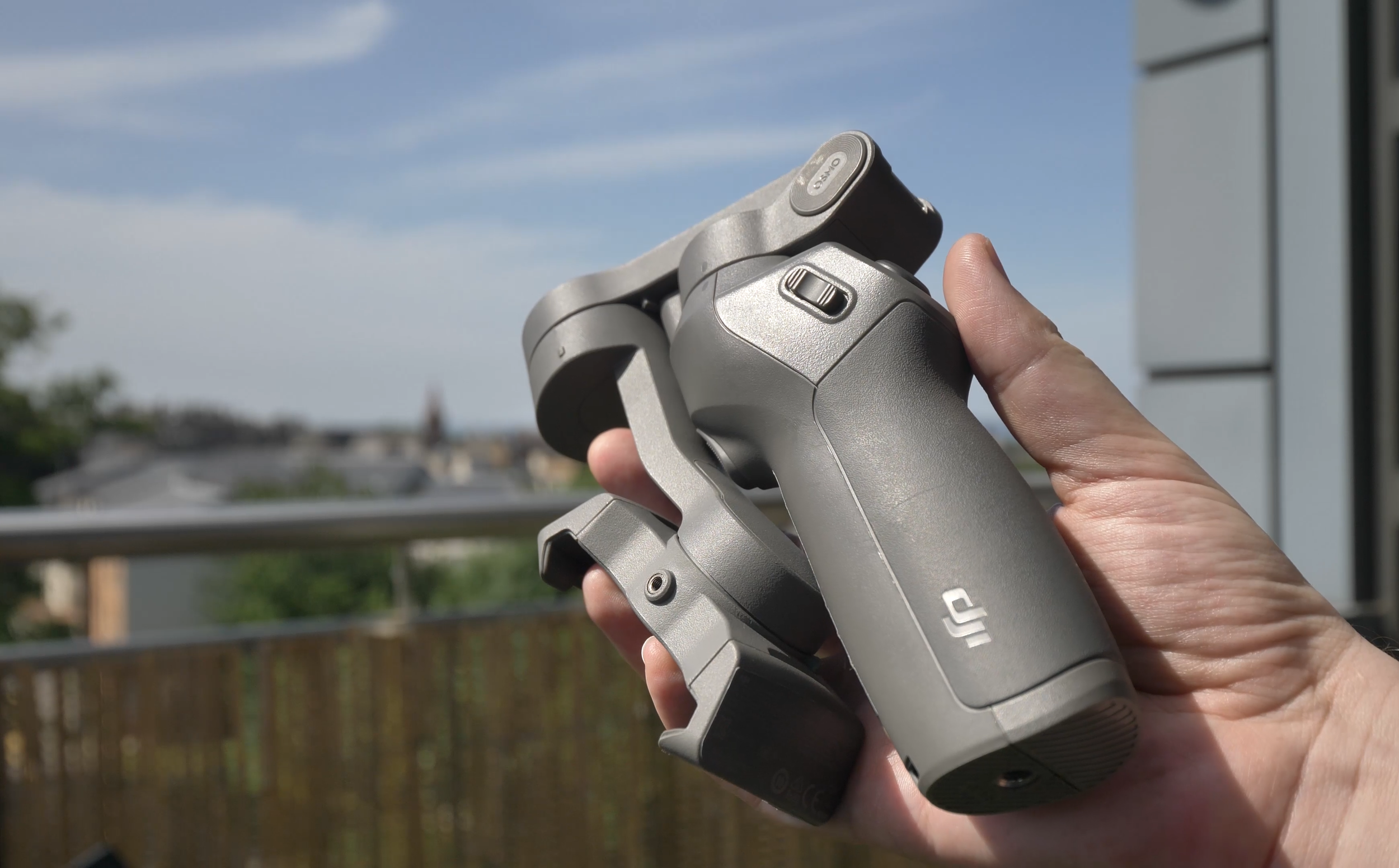
DJI Osmo Mobile 3 stabilizer, folded
We’ve been using the DJI Osmo Mobile 3 gimbal for some time now, and we’ve just released the full video review of the device on the Tech Travel Geeks YouTube channel. You can watch it below, or continue reading for the written review.
You can buy the Osmo Mobile 3 Combo on Amazon: https://amzn.to/2X1HQkY
Video stabilisation
Let’s just start with what this product is and why you might need it. It is a mobile phone gimbal, which provides one of the best video stabilisations for your phone. It will allow you to take some buttery smooth footage while filming on the move.
Here’s a sample video we filmed near Arthur’s Seat in Edinburgh, Scotland, using the Osmo Mobile 3 and the Huawei P30 Pro:
There’s a spring-loaded tension grip where you put your phone and keep it there securely. Luckily, there’s some curvature, so unlike some other devices or phone handles, it won’t press your power or volume buttons by accident.

Grip of the Osmo Mobile 3
It should fit most devices without a case or with thin cases on them, but thick gaming or rugged phones like my Doogee S95 Pro might not fit securely, so be mindful of that - it should work with phones of up to 9.5mm.
Before each use, you should balance it to get the best stabilisation of your footage, just make sure it’s nicely centered.
The footage comes out great, as you can see in some test footage. Everything is smooth and very stable, it’s best in class at the moment.
It’s great that you can use it both to film yourself, vlog-style, as if you had a stabilised selfie stick, or film your surroundings, at a flick of the switch.

Using DJI Osmo Mobile 3 as a selfie camera
Build quality
The gimbal is much smaller than I expected, especially when it’s folded. The fact that it folds is one of my favourite features - large size is the main reason I don’t use my large Zhiyun Crane gimbal for my main camera.

DJI Osmo Mobile 3 with Huawei P30 Pro compared to Zhiyun Crane and a Panasonic Lumix G80 camera
You can easily notice its weight at 404 grams or 14 ounces, but it makes it sturdy and very solid. Overall, despite it being made of plastic, I really like the build quality and the fact that it fits nicely with the DJI design language.

DJI Osmo Mobile 3 next to the original DJI Mavic Air drone
Hardware controls
When it comes to hardware controls, make sure you check the unboxing video, which you can find embedded below. We went there through all of the controls on the device like the joystick and the buttons. With those controls, you’ll be able to tilt, zoom, record, switch between camera positions, all without touching your screen. The controls are really handy and allow to focus on filming. It’s also great that you can configure the speed of response to get more cinematic footage. Plus, the battery life is fantastic - 15 hours should last a few days of shooting, plus it even lets you charge your phone, so you basically get a free powerbank included, great stuff.
Software
The Osmo Mobile 3 comes with the DJI Mimo app, which is a bit of a mixed bag, especially on Android. Interestingly, DJI released a major software update as we were finishing this review, so my device is actually better now than it was just a few days ago.
One of the issues was to do with frame rates and slow motion. Up until recently, you could only shoot 30 frames per second and there was no slow motion option. After the release, some phones now should have 8 times slow motion support - it works on my Huawei P30 Pro, but not on the Samsung S9+, which should support it as well. Similarly with 4K 60 frames per second, which my Samsung should support, but all 60fps options are greyed out. On Huawei, I can select 60fps options in FullHD, but since the phone itself doesn’t support 4K60, no luck for me there.

Limited frame rate selections currently on Samsung Galaxy S9+
When supported, slow motion functionality can be quite useful, so I hope DJI continue working on improving the app.

Filming slow motion video with DJI Osmo Mobile 3
The other major issue is that there’s no support for wide angle camera, you can only use the main lens. That’s a major bummer to me as well, since wide angle cameras are really cinematic in modern phones.

Lack of wide angle lens support on DJI Osmo Mobile 3
In addition to the video mode, there’s also photo mode, which can be useful for group photos - just enable gesture control and you can snap a great photo of yourself or with others.

Using DJI Osmo Mobile 3 with gesture control to shoot group photos
Functionality of the app depends heavily on the phone you have - in addition to missing slow motion, my Samsung S9+ didn’t have the night mode, HDR video or video bokeh, but to be honest, I’m not sure I’d be using any of them with the gimbal, since they have better equivalents in native camera apps.
However, the panorama mode is actually really useful with a tripod, so it’s worth checking out. It combines 9 photos into one, as per the example image below.

9x9 panorama photo taken on DJI Osmo Mobile 3 and Huawei P30 Pro
Timelapses are great and allow you to select up to four points which the camera will follow, as per the lovely shot of a swan which you can see in the video review.
There’s also hyperlapse, which is a moving timelapse or a video in fast forward. Stabilization helps a lot in this case. You might have seen it already in our sample footage, it’s really great.
Story Mode
So far, all the functions before are common in other camera apps, but two are quite unique to DJI Mimo. The first is the Story mode. It allows you to create short video stories, which follow a certain theme. There’s plenty of them to choose from, all with musical background and some transitions in between shots. Just follow the on-screen instructions and record between 3 and 6 quick shots, and the rest will be done automatically. For people who don’t have the time for video editing, this might be very useful. Just be careful - templates with text will actually add the text in, so you might end up with some random quotes like I did. What’s more, the default resolution is 720p (or HD), so you have to change that yourself, and you might also want to remove the Osmo watermark. Luckily, you only have to do it once.

Story mode in the DJI Mimo app by Moment
On the positive side, you can customize the templates or create your own, so if it’s something you’re into, it’s worth trying.
ActiveTrack 3.0
The main reason to use the DJI Mimo app, however, is the ActiveTrack 3.0 functionality. If you’ve used other DJI products like their drones or the professional Ronin stabilizers, you might have seen it before. Just draw a rectangle around a target and the gimbal will do all it can to keep it in the center. It works really great. On a trip in the hills, I actually tried to lose the tracking, but it kept up really well.

ActiveTrack 3.0 on DJI Osmo Mobile 3 is great at keeping track of the target
You can also use it for filming yourself. Maybe you want to start the best cooking show ever from your kitchen, but don’t have anyone to keep the camera aimed at you? No problem, Osmo Mobile 3 will move the camera and ensure you’re always in the centre of the frame. Or maybe you want to stream a heavy metal concert on Twitch, from the same kitchen? Sure, that’s also easy, just make sure you don’t drop your amp from the stove. The possibilities are endless.
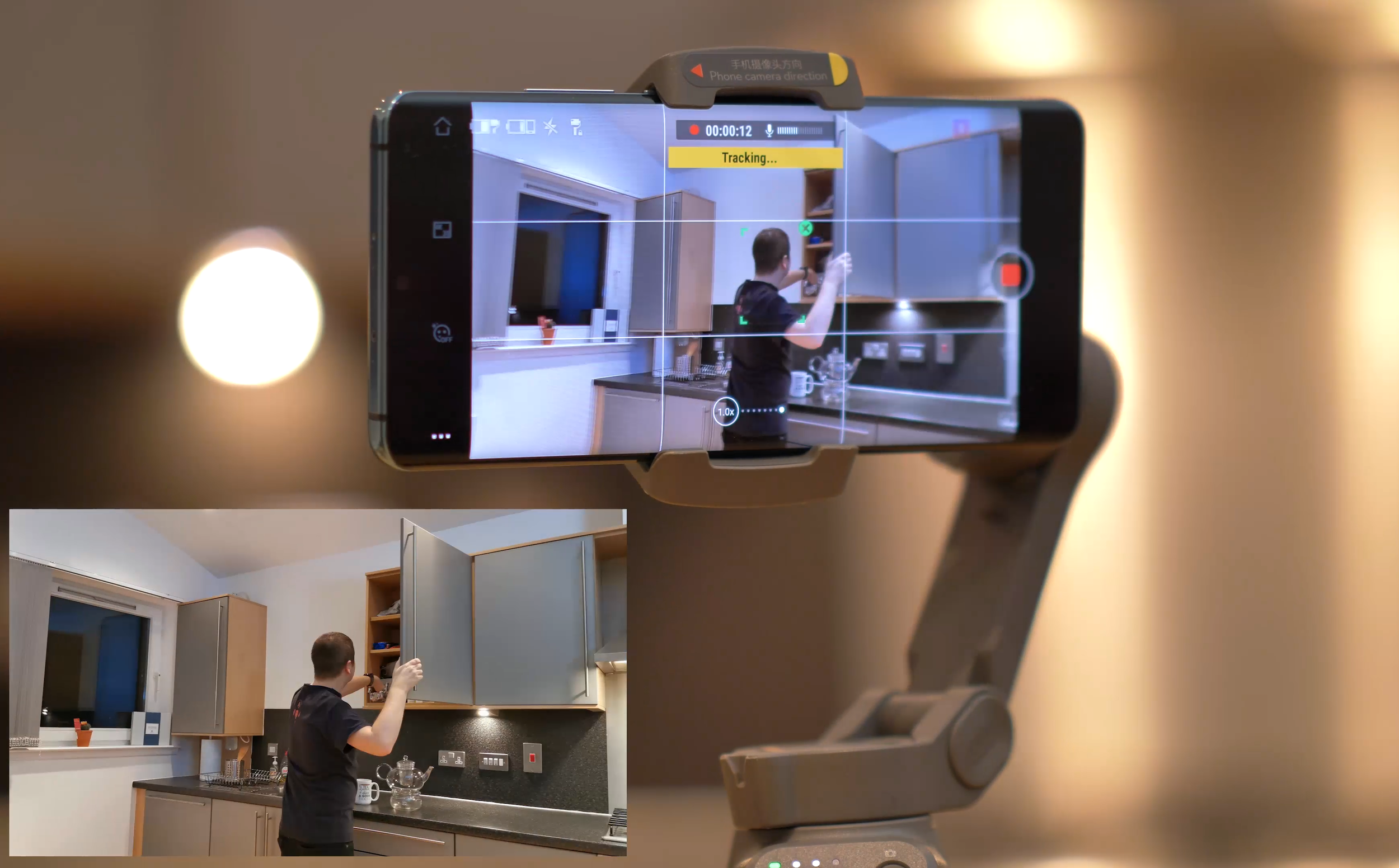
Filming yourself with the DJI Osmo Mobile 3
Overall thoughts
Overall, I really enjoy using the Osmo Mobile 3. I was a bit hesitant to start it, but once I learned how to use it properly and got to know all the features, I was sold. The image stabilisation is excellent and there’s a lot of great functionality to expand your filming toolkit. The app still needs some work, but other than that, I have no complaints.

DJI Osmo Mobile 3 with Huawei P30 Pro, as seen in the Scottish seaside
Thanks for checking this Tech Travel Geeks review!

Doogee S95 Pro Super - Rugged Modular Phone Review - IP69K Waterproof Heavy Duty Smartphone
The Tech Travel Geeks’ Lukasz reviews the Doogee S95 Pro rugged modular smartphone. Want to know what he thought about the build quality, performance, cameras and added modules? Watch the embedded video or read the blog post with sample photos and videos
On the Tech Travel Geeks Youtube channel we unboxed the Doogee S95 Pro a few months ago, and had also unboxed the device when we visited their offices in Shenzhen. I’ve been using the Dooogee S95 Pro on and off since then, but I moved my SIM card from the Huawei P30 Pro to it a few weeks ago to properly review it.
You can buy the Doogee S95 Pro Super kit on Amazon: https://amzn.to/2T0NQdt
Want to know what I thought about the build quality, performance, cameras and added modules? Watch the video below or continue reading to find out, and make sure to subscribe to Tech Travel Geeks for more content like this.
Build quality
Doogee S95 Pro rugged smartphone
First of all, the phone is built like a tank. It’s a proper rugged phone with IP68 and IP69K certificates, which means that it can survive “powerful high-temperature water jets”. That’s thanks to industry-leading rubber on the back, which can survive a lot - so much so that it passed the MIL-STD-810G military environmental tests, and that certification isn’t easy to get.
It’s also thanks to the fact that all the ports like USB, SIM and microSD card are securely covered from any external factors.
We took it further though and wanted to see how much it can survive. The phone managed to stay on while being frozen and survived getting “liberated” with a hammer, which is amazing.

Doogee S95 Pro frozen in ice
But then we decided to see if the phone can survive being driven over by a Tesla. The first attempt, on the grass, seemed to be successful, with just some scratches on the screen protector. Unfortunately, the second attempt, on concrete, affected the phone quite significantly - initially the camera app wouldn’t open, and then the screen stopped working properly, getting ghost touches. Removing the screen protector didn’t help solve the issue unfortunately.

Friendly reminder - don’t get your phone run over by a Tesla
So, is the S95 Pro super durable? Yes. Should you drive over it with a car? Here at Tech Travel Geeks, we’d advise against it.
Due to all of this ruggedness, the phone is obviously quite heavy, clocking in at 285 grams. For comparison, my Huawei P30 Pro weights 192 grams, but that’s the price you have to pay for the ruggedness. You’ll also most likely need two hands to operate it.
Screen

Doogee S95 Pro is great for watching some Netflix
The front of the device is a 6.3 inch 1080 by 2246 pixel Full HD screen, making it 395 pixels per inch. It’s an IPS screen, so an LCD rather than OLED. The quality is decent and fine if you want to watch some YouTube videos or even some Netflix on the go, but don’t expect the quality or refresh rates seen on OLED screens in current smartphones. Luckily, it’s still bright and good for daily use.
Performance

You can even play Fortnite on the Doogee S95 Pro!
What really positively surprised me was the performance. Having been mostly using phones with high-end chipsets, I was a bit worried about using a MediaTek chipset. However, the octa-core 12nm Helio P90 chipset impressed me personally. The software experience in the everyday usage was great and with no slowdowns. Everything was really smooth.
I wanted to test it to its fullest and tried throwing all the high end games at it, and I could barely make it sweat. All the recent racing games Asphalt 8 and Asphalt Xtreme were really smooth, and the latest Asphalt 9 was easily playable, with just a bit of a performance hit, but nothing impacting the gameplay. The same with Need for Speed: No Limits or Crazy Taxi Classic. I then tried first person shooters, and Dead Trigger worked really well, PUBG was mostly good, with some minor slowdowns. I was even able to play some Fortnite, with just some minor slowdowns. Only thing to note is that some games took a bit longer to load, despite 8GB of RAM, but you only need a bit of patience, that’s all. Overall, for such a device, it definitely exceeded my expectations.
Speaking of memory, the phone comes with 128GB of storage, and supports microSD cards in case you want to expand it even further.
Software

Doogee S95 Pro running Android 9
The S95 Pro uses Android 9 and hasn’t received a major update in the last 6 months. What’s more worrying, though, is the lack of security updates. As of writing on 8th May, my device is still stuck on January 2020 update. That’s not great unfortunately, so keep that in mind.
Doogee’s launcher is rather basic and doesn’t have an app drawer, so I installed Action Launcher instead, as I personally struggle without the app drawer. However, the overall software experience was all right.
Battery life

Doogee S95 Pro’s 5150mAh battery is great
Another area that’s quite impressive is the battery life, as expected in such a device. The phone comes with a 5150 milliamp hours battery and it will last you a day of constant usage without any problems, and even more if you don’t use your phone as much as I do. If you’re planning to go mountain biking or on a hike, you’ll be sure that your phone is safe AND that the battery won’t run out before the day ends.
When it comes to charging, you have two options. You can use a USB-C cable and plug it in. According to Doogee’s website, it offers 24W “turbo quick charge”. You can also use 10W wireless charging, which is great for a rugged phone like this. In general, you shouldn’t have any battery issues with this device.
Connectivity

Doogee S95 Pro offers global 3G and 4G connectivity
When it comes to connectivity, you should be able to use the phone globally on most 3G and 4G networks, which is great. It supports dual SIM cards, so you can either have a work and personal number, or get a cheap SIM card while travelling. What’s more, it supports NFC, so you’ll be able to make wireless payments using Google Pay or similar, which is becoming more and more important right now.
Cameras

Doogee S95 Pro offers three cameras on the back and one on the front
As someone who loves taking photos, there’s one area which would make it difficult for me to use this phone as my only phone, and that’s the camera. On paper, all looks good - there’s a 48MP main lens with the same sensor as the Xiaomi Mi 9T, an 8MP wide-angle lens and an additional 8MP sensor, as well as an LED flash on the back, and a 16MP front-facing camera.
I managed to take a few good photos with the main lens, before we had to stay home. Here’s a beach in North Berwick in Scotland, Placa de Catalunya in Barcelona and some monument in Barcelona, all looking good.



However, if you take the same photos on the wide angle camera, the colours shift towards red and the photos get darker, become pixelated and are unfortunately unusable.



Unfortunately, it’s the same with the zoom lens - here’s the Arc de Triomphe on the main camera, which looks good, but then the wide angle becomes dark and pixelated, and the 2x zoom looks like an oil painting, losing detail.



The night mode was actually quite good, as per the Sagrada Familia photos I took. Again, as long as you stick to the main lens.



Two of my favourite photos were of food in Barcelona - I really miss travelling now :)

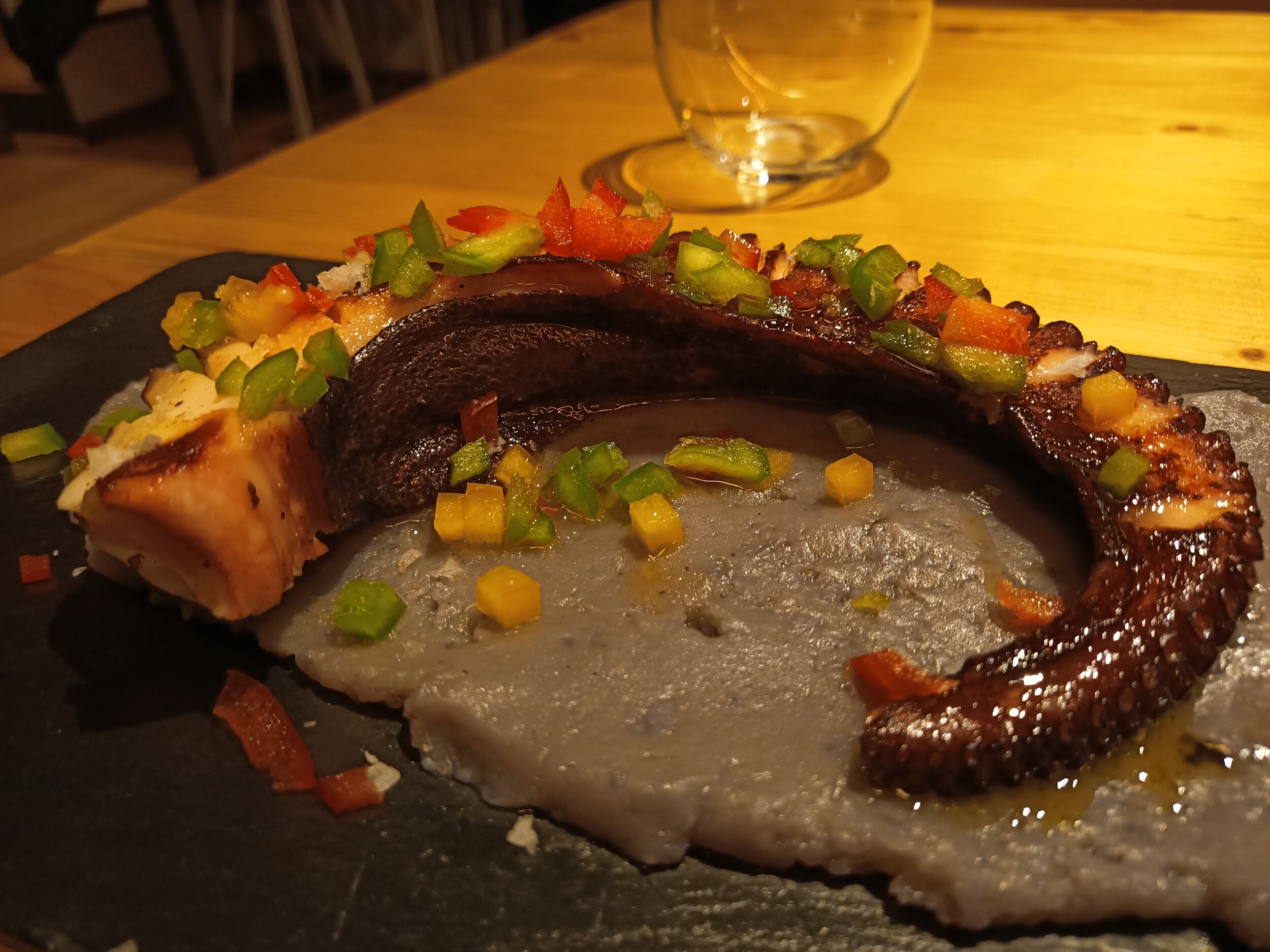
There’s also portrait mode and some shots are good, but it appears to be finding the middle of the image and blurs everything outside, so don’t use it on inanimate objects.



Selfies weren't great, but passable - oh, hi Matteo!



I also used the front facing camera for video calls with family with no issues, as well as to share some guitar practice with my teacher.
For video, you get 4K 30 frames per seconds, just be careful that it’s quite shaky, so I’d recommend stationary shots. The wide angle camera doesn’t work for video though, just main and 2x zoom. Luckily, the 2x video doesn’t seem to suffer from the same issue as photos - just look at this amazing guy in Barcelona!
Modules
Finally, let’s end on something very unique to the Doogee S95 Pro. If you look at the back, you can find a 16-pin connector. There are two optional modules which you can buy in addition to the phone and connect them to the device - a battery and speaker. Exciting stuff!

Doogee S95 Pro Super kit comes with the phone, a battery module and a speaker module
Let’s start with the battery. It attaches really easily, and it stays on really well. It has a cut out for cameras, so you can still use them while charging on the go. The battery has a capacity of 3500 milliamp hours, which means that it should charge around two thirds of the battery, or up to 10 hours. In our tests, we went from 20% to 70% in around 3 hours. I found the battery a really good idea, especially if you’re on the go and urgently need a top-up

Doogee S95 Pro battery module
The speaker module is a 6W one with two speakers, has a 2000 milliamp hour battery and should last up to 3 hours. You don’t need to connect to Bluetooth, it just works. The sound is great, it’s quite loud and can fill a room. My by far favourite function is the stand, which allows you to watch some YouTube or movies on the go without holding the phone.

Doogee S95 Pro speaker module with a stand
Summary
So, what are my thoughts about this phone? If you’re in the market for a rugged phone, this should be a great device for you. It has a great battery, surprisingly good performance, and if you go with the version with modules, the functionality of the phone will increase significantly. It can also survive almost anything. Just bear in mind that the cameras aren’t great and software updates are quite behind, so be cautious if those two things are important to you.

Thanks for watching this detailed Tech Travel Geeks review of the Doogee S95 Pro. If you enjoyed this video, make sure you leave us a like and a comment, and subscribe to our channel for more videos like this - click here to subscribe.
Check our Doogee S95 Pro unboxing videos:
Also, watch the Doogee S95 Pro comparison with the Doogee S68 Pro:

Huawei FreeBuds 3 Review and Unboxing - Active Noise Cancelling on the Go
The Tech Travel Geeks Chief Aperture Officer, Lukasz, unboxes and reviews the Huawei FreeBuds 3. These are the latest high-end earbuds from Huawei with active noise cancellation running on the new Kirin A1 chipset. We include the full video review as well.
We’re finally doing the proper Huawei FreeBuds 3 unboxing and review. Finally, because we saw the unveiling during the IFA in Berlin last year, and because we actually filmed an unboxing at an airport on our trip to China in early December. Unfortunately, the quality wasn’t that great, so we never released it. But how can we unbox something again? Well, I got a pair in Shenzhen, but I lost one of the earbuds on a trip to London, and I only got a new pair this week. Watch our unboxing and review video below, or continue reading.
Unboxing
Huawei FreeBuds 3 unboxing - black charging case
The box is similar to other Huawei boxes - make sure you check Matteo’s unboxing of the new Huawei P40 (click to watch it on YouTube). We can find that they offer “new intelligent sound” and the Kirin A1 chip - more on that later.
Sliding out the external sleeve, we find the actual box. Inside, we find the earbuds in the charging case - I went with black again, but you can also pick white or red. There’s a QR code to download the app, a USB-C charging cable for the case, as well as some instructions and the warranty.
The case, luckily, has two earbuds, so I’ll be able to get back to listening straight away.
Pairing and the app

Huawei AI Life App
All right, let’s pair it with the two devices I’m currently using - the Doogee S95 Pro - expect a review in the next few weeks on Tech Travel Geeks, and the Huawei P30 Pro. First, Doogee, since I have to do it from scratch. First, scan the barcode to download the Huawei AI app. Open the case and hold the button on the side for two seconds. Start scanning for new devices and you should see the the Freebuds 3. It only takes a moment to connect. In my case, I also had a new firmware update, just note that it takes a moment, in my case, around 3 minutes.
Pairing with the P30 Pro was even easier, since I already had the AI app installed, so a request to pair just popped up and I was all set.
The app is quite simple - you can check the battery status of each bud and the case, set the shortcuts for what happens if you double tap on each bud and set the noise cancelling levels. Make sure you play with this setting and adjust to your surroundings, as it makes quite a big difference.
Sound quality and noise cancellation
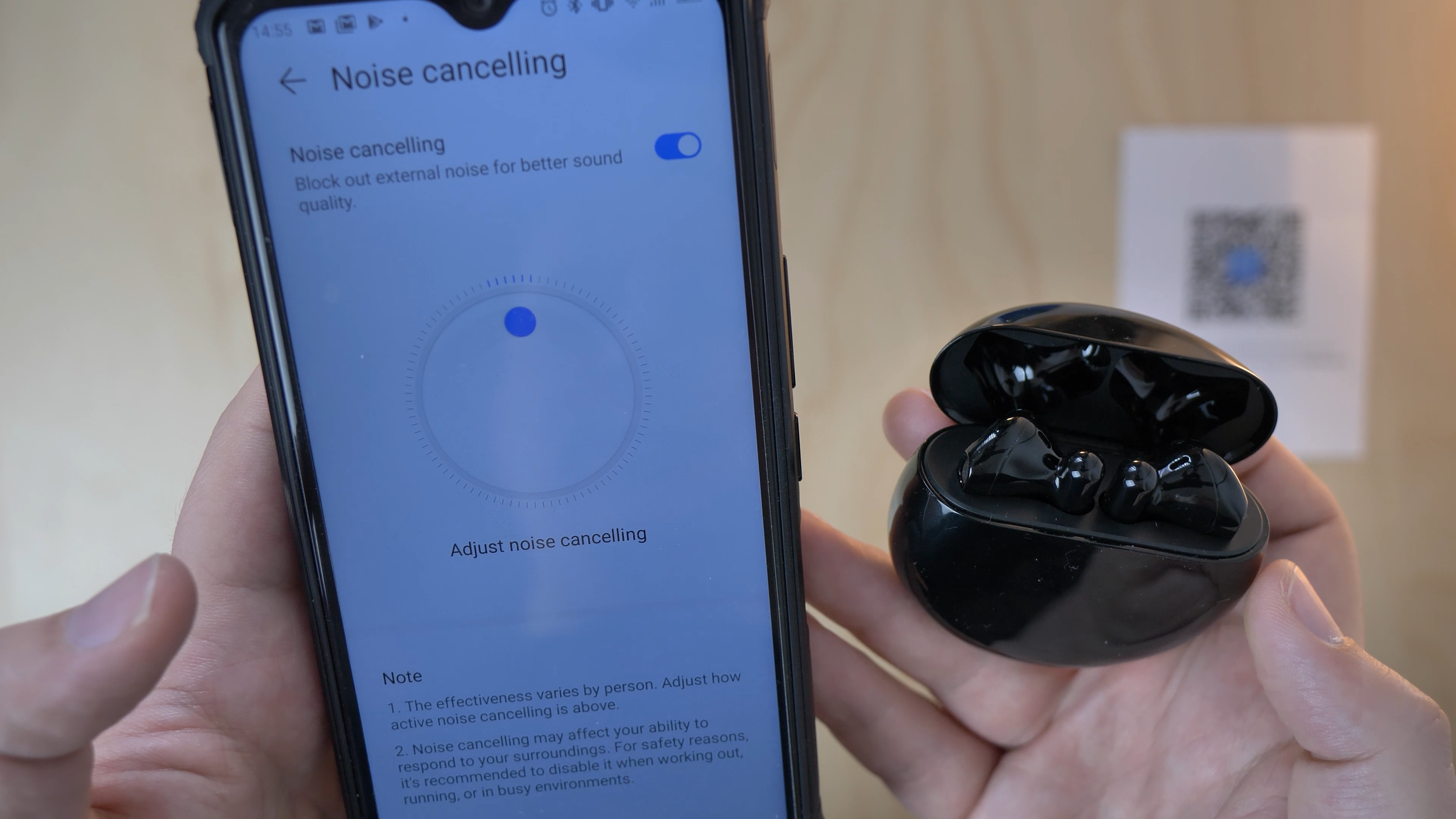
Huawei FreeBuds 3 noise cancellation setup in the AI Life app
Speaking of which: the Freebuds 3 are Huawei’s response to Apple’s AirPods, but with a major advantage - they’re the first earbuds with active noise cancelling. Thanks to their advanced Kirin A1 chipset, they’re able to cancel some noises coming from the outside. I actually used this feature on the 70,000 Tons of Metal cruise back in January and it helped balance the noise when I was too close to the stage a few times. Quite useful.
What about the sound quality? I really liked it, it’s nice and clean, and can go very bass-y, depending on the music you listen to. I’m mostly into heavier music, so I’ve been re-listening to the new Nightwish and Trivium albums and they sound great, especially the orchestral sounds. If you go from basic earbuds or just listening on your phone’s speaker, you’ll hear a lot of depth that you couldn’t hear before.
I’ve also been watching a lot of YouTube and some movies and shows, and I really liked the quality for that as well.
I also tested them during some calls with my family on WhatsApp and I was told that the microphone quality was all right. In a moment, you’ll hear a quick sample recording from the Freebuds 3 for your reference, compared to the Blue Yeti X microphone I recorded the rest of the audio with. You’ll notice that there’s some extra noise in the background, especially when I made any smallest movements, so don’t expect to use them to record any audio.
One thing I missed was an equalizer, to adjust the tone to your liking, like I can for example with my Sony XM2 headphones. However, you should be able to get a good sound from the default settings anyway.
Batteries and charging

Huawei FreeBuds 3 Batteries and Charging
The batteries are really good, they last up to 4 hours non-stop, and you can quickly top it up with the case in 30 minutes. As such, you shouldn’t have issues with keeping them charged, as long as you keep them in the case and recharge it from time to time.
The buds themselves get charged by the case, and the case can be charged either with a USB-C cable or through wireless charging. For that, you can use a wireless charger, or if your phone supports wireless reverse charging, you can use that instead. My P30 Pro supports it, and I’ve already used this feature many times, it’s really helpful when you’re out and about. Just make sure you put the case in the right spot of your phone.
Summary

Huawei FreeBuds 3 - my favourite earbuds right now
I got the buds on Amazon for £114 this time (click to find it on Amazon), which is a price decrease since it was released a few months ago. If you want to spend less and prefer a more in-ear cone build, you can wait a bit more to get the new Freebuds 3i, which will go on sale on 20th May for £89. They’ll also have active noise cancellation, but smaller sound drivers and it’s still to be confirmed if they have the Kirin A1 chipset.
As you can guess by now, I really enjoy the FreeBuds 3 - so much so that I bought them again after losing one of the buds. Well worth it if you like this specific kind of earbuds, highly recommended.
Thanks for watching, make sure you subscribe to our channel for more videos, thanks from the Tech Travel Geeks!

The State of Smartwatches in 2020 - Is there any point?
Smartwatches were supposed the next big thing…in 2014. I still remember driving in my car on my commute from Sunderland to Durham listening the (relative) surprise of the launch of Android Wear. I remember analysts and commentators talking about the seismic change to “wearables” as the next big thing in tech.
Google hadnt been first to the smartwatch game. Samsung had released the OG Galaxy Gear Watch with the Note 4 in 2013 and a fat of third party companies were getting in on the act. Pebble, Fit-Bit etc.
Android Wear (now Wear OS) was the first to be based on Android and controlled by Google. A flurry of devices came, the Galaxy Gear had multiple versions, the LG etc etc
TBH, I was a bit sceptical. It seemed to be a “manufactured” category. What I mean by this is that whilst mobile phones/smartphones had grown organically with progression from the Nokia 3210 days, to sliders, thin phones, flip phones (Moto Razer for example), touch screens and then the seismic shift to smartphones with BlackBerry and of course the iPhone. There was a sense that a product category existed, and companies were competing to make the best product and the consumer was all the better for it. Phone shipments rocketed, smartphones became the norm and internet access became a basic human need (along with food water and shelter).
But in a a capitalist society based around growth, something more was required. Columns and inches were written, Videos published about how this was a “gamechanger”. And of course Apple was about to “invent” the smartwatch with the Apple Watch.

Galaxy Gear S2
It just didnt happen. he public too didn’t seem to be too enamoured with them, I rarely saw “one in the wild”.
But I’m a techie…
So after resisting the magpie urge, I decided to take the plunge in 2016. By then Samsung had dropped Android Wear for Tizen (which worked surprisingly well). It seems the market was maturing and we were getting watches which looked like watches note just mini-smartphones on out wrists (LG Watch anyone?) Although to be fair the OG Moto 360 was first to that.
So I went for the Gear S2 (as shown above). It looked like a watch, ran smoothly, though the battery life was pants. A day max. The app store was a bit bare but I liked the rotating bezel, which seemed to work much better then touchscreens on Android Wear watches.
The problem? It worked best with samsung devices (it did work with others but the health features werent there and there were other severe limitations). It was now another device to get ready and charge. Half the time for sterility reasons they had to be removed in theatre and i wasnt so much into the (basic) health tracking that was there. After about a year, in 2017 I decided that this was an unnecessary piece of kit, sold by big multi-nationals to shore up a saturated smartphone market increasingly dominated by Apple and Samsung. it was surplus to requirements and so I got rid of it.
in late 2019/early 2020, I decided to revist them. I was seeing a lot more Fit-Bits and Apple Watches (the Series 4 seems to be where they really took off). Plus “proper” watch makers like Fossil, Garmin etc were really getting into it. So i decided to try the device in the opening picture. The Mobi TicWatch.
I’m not going to delve into a full review as that deserves a piece of its own. But I will say this. Connectivity is much better. Google Fit gives me a multi-device platform for health tracking (I was on a mission to get health so was often at the gym). Battery-life was 2 day+ (so no remembering to charge everynight) . it looked nice, and its dual LED screen meant even if you did lose battery, it was functional as a simple timepiece.
WearOS still isnt the best or most intuitive. But I found myself getting used to it. When I forgot it at home, I’d glance at my wrist to check notifications only to realise it wasnt there. Similarly if I’d forgotten at the gym then I’d look at my wrist to play the next song on my playlist (Eye of the Tiger!) and then realise i didnt have it. Plus it had the fantastic ability to connect to my phone so i could answer the phone on my wrist Star-Trek style (#80skid #Nerd)
The fitness aspect with Google Fit have also matured nicely and it again comes in handy for step-counts and heart rate monitoring.
I’d got used to life with it. In a way that we are now completely used/dependent on our smartphones, in certain situations this was happening too, e.g. driving and knowing what notification can be safely ignored or I have to pull over and answer.
They weren’t the next big thing, they weren’t the indispensibale future of tech. But slowly they have found a niche, it just took longer then the manufacturers wanted.
When you think about it, they are 6-7 years into their product cycle. The feature-phone also was about 7 years, and the smartphone a bit quicker at 4 years. In fact (despite the big companies efforts’) they just followed a regular pattern in technology.
Me? I’m keeping my TicWatch, might even upgrade. I dont wear it all the time. But I miss it when i forget.

Xiaomi Mi 9T (Redmi K20) - All the Tech Travel Geeks videos
All the Xiaomi Mi 9T (Redmi K20) videos by the Tech Travel Geeks in one place: the review, the unboxing, the sample video and the case Matteo is using.
In July I ended up buying a Xiaomi Mi 9T from eGlobal Central and have been loving it since it was delivered.
Lukasz, our Chief Aperture Officer, and I have made a few videos for the Tech Travel Geeks YouTube Channel about the Xiaomi Mi 9T. It is now time to share them with you here on the website too.
We really enjoyed making these videos, and overall it is a device which has earned the honour of housing one of my main SIM cards.
Would you like to know more? Is there anything we haven’t covered and you have questions about? Reach out to us on Twitter, leave a comment on this post or on any of our YouTube videos. We are happy to geek out about this excellent device.

Huawei P30 Pro - All the Tech Travel Geeks Content
All the Tech Travel Geeks content about the Huawei P30 Pro. So shiny! Such good camera! Very power efficient! WOW!
The Tech Travel Geeks Chief Mobile Opinionist was a guest of Huawei’s at the launch of the Huawei P30 Series in Paris, France. The Tech Travel Geeks Chief Aperture Officer liked the Huawei P30 Pro so much, he decided to get one himself (in another colour).
Here you will find all the videos we will create for the Tech Travel Geeks YouTube Channel.
Huawei P30 Pro Breathing Crystal Unboxing - Paris
Unboxed on the day of the announcement. So fresh!
Huawei P30 Pro First Impressions - Shiny Powerhouse
A masterfully edited and filmed video. Well done to Lukasz.
Huawei P30 Pro Smart View Flip Cover Unpackaging & First Impressions
Unpackaging the case to keep the device shiny.

"A Little Bit Of Plastic On A Case..."
Majid explains how an additional piece of plastic on a smartphone case can be very, very useful.
Video content on my phone. It always seems a “naff” as an idea. I mean How can you get an immersive experience on such a (not-so-small) screen? That,s why often you see people carrying tablets and laptops whilst travelling. Sure I normally prefer the big screen, but lugging around a 42in OLED TV travelling is (unsurprisingly) not very practical.
Having said that, carrying another device (laptop, tablet etc) may also be a bit of a pain. With every device comes its paraphenalia (chargers, cases etc etc).
Frankly, I just couldn’t be bothered, and I’d sit there watching stuff on my phone. This was never as good, not because of the screen size, but by the fact that you have to hold it, or prop it up and watch it on a strange viewing angle.
A lot of people have flip cases with their phones, which can double up as a rudimentary stand. But the solution in the above image, has drastically affected the way that I watch content on my smartphone. The case itself is an unbranded non-descript one from eBay/China. There are many variants for many devices. Mine is designed and made for my OnePlus 6. On recent train journeys, it has made watching hours of video content enjoyable, with good viewing angles, and no arm-ache from continusly holding a phone.
I love it, and its my top travel tip for the week!

An Ode to Dash-Charge
“You are my sunshine, my (only) sunshine, you make me happy when skies are gray”
Tech Travel Geeks Emily AKA Majid declares his love for Oneplus’ Dash Charge.
Battery Anxiety: Low charge on smartphone leading to irrational behaviour
Dear Tech Travel Geeks readers,
A few years ago LG stated that a significant number of smartphone users start getting very twitchy when the charge on their phones is low. This is not surprising, as a species it seems we are addicted to our smartphones, and would have difficulty if our phones were to die.
Some may think of this just as FOMO (fear of missing out): not being able to check messages, phone calls, social media etc etc. Also genuinely useful things like using Google Maps for Sat-Nav and directions or if your smartphone is your primary camera (like mine is to me),
Manufacturers have attempted to address this issue using different methodologies. Originally we had removable batteries. That sadly was one of the causes of poor build quality and industrial design (the Samsung Galaxy S5 fake leather plastic back for example, or the LG G5 modular metal). Then, as smartphones became more capable and important in our lives BIG batteries started being more common: 4000 mAh and then even 5000 mAh batteries started coming up. This in turn has caused its own problems (Do you remember the Samsung Note 7 issues?). Some manufacturers started also working on added software optimisations (like Huawei with its EMUI Android softwarre).
Chipset and component manufacturers also worked on physical solutions like quick charging solutions. Qualcomm has Quick charge for example (now up to version 4).
My personal preference is for OnePlus’ solution: Dash Charge. Even after having got through four separate OnePlus devices (3, 5, 5T, 6), the SPEED with which it charges is amazing. Put your phone in at 1%, 30min later you can be at over half a full battery. THAT kind of speed.
The way OnePlus do it is proprietary, yes they have a large amp plug, but there’s software optimisations in OxygenOS and most importantly, some complicated electrickery stuff in the cable. If you attach a normal USB A to C cable into the plug, yes you’ll get fast charging, but not Dash Charge-speed.
In this era of £1000 phones which often have very average battery life (looking at you iPhone eKs), Dash Charge is simply great. I always travel with my Dash Charger, and sadly need to say no to iPhone users who ask to borrow my cable (it won’t work).
Yours truly,
Tech Travel Geeks Emily
(Also Known As Majid)
Would you like to know more about Dash Charge?

What's in my bag - Round The World edition
Lukasz is on his amazing round the world trip. In this post he enlightens us on what tech he is carrying with him on the epic eastward journey.
Welcome to a new section on Tech Travel Geeks - What's in my bag. We'll be talking about the tech we love and carry with us on our travels. First off, Lukasz.
And it's a big one. This year, I got extended annual leave at my full time job (I work at Skyscanner, the travel search website), and I will be using it to fly around the world in just under 6 weeks. Below, you will find a map with my itinerary:

Around the world in 41 days
Bag

The challenge with this trip is that I hate checking my luggage in - extra time wasted before the flight, risk of losing the luggage, and you need to wait for it to show up after the flight. So I'll be trying to pack all my camera gear, productivity equipment, as well as clothes for the whole trip into one carry-on bag.
My choice of bag is the Hugger 30l Black Camo bag by Douchebags. I've been very happy with it so far, but I've only used it on two short trips, so you can expect more information about this bag in the future. It's been great so far, with a large and comfortable main compartment, handy top pocket (especially at airports) and a laptop case on the back. We'll see if my opinion changes after 16 flights and 33,000 miles.
Camera and lenses

As Chief Aperture Officer at Tech Travel Geeks and a big camera enthusiast, the majority of space in my bag is taken by my camera equipment. My camera of choice is the Panasonic Lumix GH5, which is one of the best Micro Four Thirds cameras on the market, especially for video shooters. It has fantastic 4K image in 60 frames per second, which allows me to get slow motion from all of my footage without the need to change any settings. It also has top-of-the-line image stabilization and a way-too-uncommon flip-out screen, which for me is a deal breaker for other cameras. Sony, your move!
I'm also taking a few lenses with me. Starting from the widest, I have the 16-36mm equivalent lens, a 24-120mm equivalent zoom lens, my favourite - the 85mm-equivalent lens, and the telephoto 70-200mm equivalent. I might have to leave one of them home, as they don't all fit into my Amazon Basics camera bag, but we'll see how much space I'll have when I add clothes and other necessities.
For audio, I'm taking the Rode VideoMicro microphone with a wind shield. This time, I'm leaving home the Zoom H5 audio recorder due to space constraints, and because I wouldn't most likely have enough time to use it for run-and-gun filming.
Other filming equipment

- DJI Mavic Air drone - the smallest 4K drone available, a fantastic and hugely enjoyable tool which allows creating some amazing footage. You can see my unboxing and first impressions video, recorded for Coolsmartphone.com, on my Youtube channel, but also expect more on TechTravelGeeks
- GoPro Hero 5 - a useful tool especially for extreme sports and water sports, so I'm hoping to use it a few times, together with the floating handle and Lumecube, a great waterproof LED light, which might come in handy underwater
- Joby GorillaPod - the key tool in Casey Neistat's arsenal, so I couldn't leave it out. What I'm leaving home, however, is the Zhiyun Crane gimbal stabilizer, but it's way too big and heavy for this trip
Phones
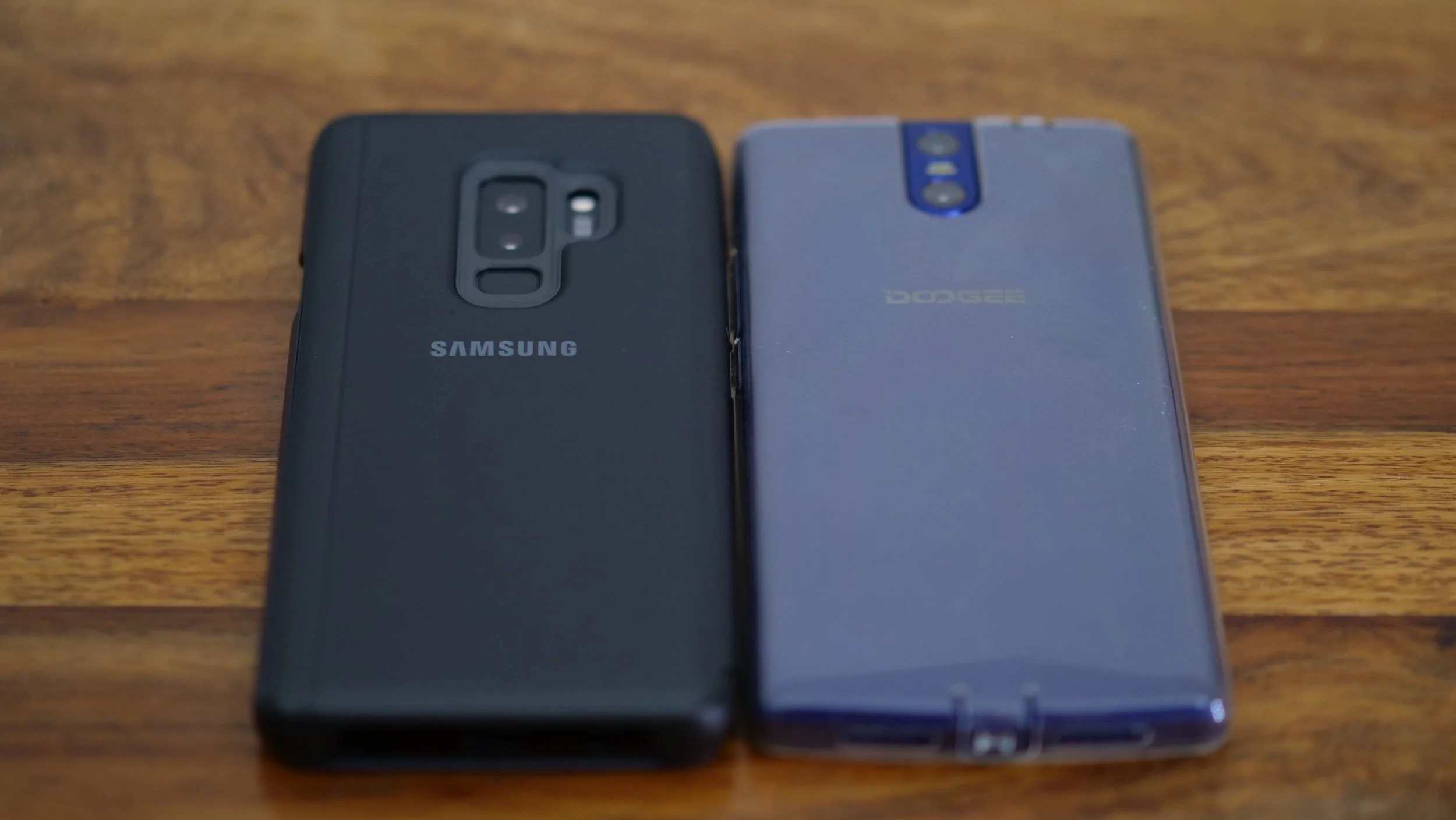
My current daily driver is the Samsung Galaxy S9+, which is a fantastic phone. You can watch my other videos about it on our Youtube channel, including the unboxing video and a comparison with the S8+, focusing on travellers. I'll definitely take it through its paces during this trip.
In addition to this, I'm also taking the Doogee BL7000 (thanks, Matteo!). It's actually the first time that I'm taking two phones with me, but I'll be treating this one as a power bank/music player most of the time. This phone has a 7000mAh battery, so I'm taking it instead of an extra power bank, with the benefit of using it for other purposes as well.
Laptop

My laptop of choice is the new 13.3" Microsoft Surface Book 2. I've stayed with Windows over the years, and I couldn't be happier with this laptop. It has top specs, which allow me to edit 4K video without any issues, great keyboard, and a screen which transforms into a tablet. You can expect a more thorough review on TechTravelGeeks in the near future.
Since I film everything in 4K, and film a lot, I need lots of storage. I'll be taking two portable hard drives, 2TB and 4TB, initially as redundancy, and in case I use more data, as extra storage. I'm also taking a number of SD and MicroSD cards, there's never too many of them.
Entertainment

- Nintendo Switch - it's my first console since the Playstation 2 (I don't play that many games), but I couldn't be happier with the purchase. However, even though I have a few AAA titles like Mario Odyssey and The Legend of Zelda: The Breath of the Wild, and more recently - Doom, I usually play quick games like Pinball and quick racing games
- Sony WH-1000XM2 Wireless Noise Cancelling Headphones - my first noise cancelling headphones, they really changed my commuting and travelling experience forever
- Chromecast - for streaming from my phone or laptop, in case there's a TV and decent WiFi in one of the hotels
Cables and chargers
Lots of them. However, I'm trying to limit the number of chargers I'm taking, so I'll be reusing the laptop charger and drone charger for recharging other devices, since they both have spare USB outs.
I'm also taking a universal power adaptor, which supports 4 different types of outlets, as well as an extension block.
I hope you liked this new section on Tech Travel Geeks. If you did, please don't forget to subscribe to our YouTube channel and hit that "like" button. Also, please do contact us through the comments section on YouTube or via our social media channels, we'll be really happy to hear from you. Thanks for reading!

We like Mockodile...
Really, we do.

It all comes together when consumer electronics reach a point of near commoditization. Differentiation of products then becomes one of brand, image and perception of minor unique selling points.
Mockodile both facilitates and accelerates the differentiation of consumer electronics. Accessorization helps individuals make a statement about their identity when they have a commodity like a smartphone. Why not make that statement with mockodile?
In my writing I sometimes highlight the glorious mockodile products that we see come to market.