

Redmi Note 8T Review - Introduction: How the NHS made me decide to get a Xiaomi
An introduction to what brought Majid to purchasing a Redmi Note 8T.
Xiaomi has really hit it out of the park over the last few years. Coming from relative obscurity in the West 5-6 years ago, to now being one of the biggest consumer electronics brands in the world. There have been major successes such as the Mi 9T, the Mi A Series, as well as sub-brands like Redmi and Pocophone. They have brought innovation, great features at amazing prices to audiences worldwide.
I have owned a number of Xiaomi devices in the past, from the original Redmi Note to the Mi 9T (Redmi K20). Every time I have been wowed by the design, the features and the value for money.
But… (there is always a but)
MIUI, Xiaomi’s version of Android, is not my favourite android skin (sorry Matteo, I mean distribution). I am not a “Stock” Android purist, I have had many different devices over the years, and things like One UI (from Smasung), LG UX (from, you guessed it, LG), EMUI (from Huawei), and others, each bring their own value and features to each device. I even wrote an ode to Samsung’s old TouchWiz once! (https://www.coolsmartphone.com/2016/08/24/an-ode-to-touchwiz-surprisingly/) and really liked One UI on my (stolen) Galaxy Note 9.
Just for clarification, I say “Stock” in quotes as there is really no such thing: there is the Android Open-source Project (AOSP) on which OEMs build their own experiences, Google included. My personal favourite is Oxygen OS from OnePlus which is fast, configurable and updated regularly.
MIUI is a bit too much for me. It looks and behaves too much like iOS (Apple’s mobile operating system). I think MIUI feels heavy, bloated, and full of unnecessary apps. I couldn’t disable or hide, let alone uninstall, the apps or services I didn’t want in most cases. MIUI 10 on the Xiaomi 9T (Redmi K20) has improved a lot in this space, but basically after using the OnePlus 7 Pro, I just couldn’t deal with MIUI, and so like many of my previous devices it got sold or passed on to someone who would benefit more from it.
I’m not a professional reviewer or influencer at Tech Travel Geeks yet, so companies haven’t sent me stuff to review recently. I have use my hard-earned cash when choosing and purchasing devices. So having made that clear, why did I end up purchasing a Redmi Note 8T?
The reason is my employer, the national institution which is the National Health Service also known as the NHS.

Now before you ask “what in the world of all that is holy in the Linux kernel”, I need to provide you with some context.
The NHS is a cash-strapped organisation, this isn’t big news to nobody. IT support and software vary widely round the country due to the nature of the regional organisation of the NHS and procurement being different and varying between Trusts and Hospitals. This is in part due to limited oversight from the Department of Health when it comes to the day-to-day running of the NHS. In this environment, its not surprising that IT has its challenges. Most machines with desktop operating systems are only just getting updated to Windows 10. Much software in use feels like it could have been written by an 8 yr old with Amiga BASIC, and there are also considerations around legal requirements of Information Governance and patient confidentiality in the mix.
There have been some successes withing the English NHS as well: I would like to give a shout out to Dr Li (https://twitter.com/ywl197) for his work in integrating patient records. There have also been successes in electronic patient observations and even tele-medicine. But these differ from hospital to hospital and do so wildly sometimes.
As a junior doctor, IT support wasn’t really front and centre for me. I was rotating around hospitals frequently, doing night-shifts, all while sitting professional Royal College exams. As long as I could do what i needed to do at work, then that was enough for me. That’s the sort of background to how I got my Lenovo Miix 510 (https://www.techtravelgeeks.com/blog/2018/10/10/the-perfect-travel-laptop-which-doesnt-break-your-wallet) which fulfilled my needs, and I had a desktop computer at home for when i needed to make presentations/write papers and needed a full desktop experience.
Now that I have been a consultant for almost 5 years and am a permanent employee of the NHS, my outlooks on matter have changed. When I look at my friends working in (non-healthcare) companies, i see they get company laptops, company phones, company cars and anything else they need to do their job.
Me? I just have my trusted Lenovo Miix and use whatever phone I own at that point. I could try and get a Trust-certified device, but I’m not sufficiently up the management food-chain for that yet.
I have at many times decided to use multiple devices at once, hence the hashtag #Dr2Phones, but I’m nowhere near our Chief Mobile Opinionist’s levels. This is probably because I’m a tech enthusiast (and seem to have no interest in paying enormous mortgage according to my wife). I like to try out different things and see what form factors and software experiences work for me. Having said that I have never reached the stage where i needed 6 phones (looking at you Matteo).
This all leads me to the situation where my personal phone and SIM card is what I use at work. I’ve always had some reservations about this, but as a Doctor it is what I have been doing for the 17 years. I just get it done. Most of my colleagues are in the same situation, and don’t seem to be having issues around this.
Recently this was now starting to have an impact on my personal life. I found myself replying to work emails when out on a Saturday night with friends or answering clinical queries via a WhatsApp from junior colleagues in the evening.
This situation has ramifications: I find difficulty switching off and detoxing from tech. I also found this was causing disruptions to my family-life and blurring of professional boundaries. Generally, this could have caused trouble.
Therefore at the beginning of this year (and decade), i resolved that it was time to compartmentalise fully. It was time to make a clear separation between my work and personal life. This meant that my personal phone number would be separate from my work number. I tried this on a dual SIM device, but again that was a non-starter as I just kept on getting “dragged back in” as Al Pacino said in The Godfather 3 because notifications still popped up.
I decided it was time for a new smartphone. Unfortunately, my stolen Samsung Galaxy Note 9 had left me severely out of pocket. I could have gone for a carrier provided device and SIM, but I couldn’t seem to find the right fit (is it me or has carrier choice/value in the UK decreased significantly?). Plus I already had another SIM and you always tend to save money buying outright over a couple of years.
As an NHS England Consultant Anesthesiologist what do I need from a work phone? Well, the same things you want from a good travel phone (see what I did there?).
The list is like this:
Good battery life
Descent performance
A reasonable camera (for scanning documents)
A nice screen to facilitate editing files
That’s basically about it. I also want a work device to be inexpensive. I am very conscious that I am lugging around almost £1000 worth of equipment in my bag at work, and security is a problem in some hospitals. I also work in operating theatres where there are communal areas outside the theatres themselves lockers are limited. The whole point of this exercise is to enable me to be contactable, especially in an emergency. There is no point in making the upgrade if your phone is sitting in your tiny locker and not getting used for what it’s for.
I thought of just getting something like the Nokia 1 or current equivalent budget smartphone. Frankly I needed and wanted a bit more horsepower, and whatever I thought of MIUI (Xiaomi’s Android distribution) I knew that Xiaomi was a brand I could trust with quality and security/OS updates rather than other branded devices. Yes I could have gone the whole hog and spent more and got something with enterprise-grade security (e.g. Samsung with Knox, Pixel with the Titan M chip or the recently departed Blackberry KeyNumber device) but the price factor always came back into play. Remmber, this was my own money I was spending.
I shopped around, and came across the Redmi Note 8T. It looked good on paper, the symmetry of having had the first Redmi Note in 2015 and now have the 8th one appealed to my sentimental side… And what I got for £150 astonished me.

This has been a bit of a long intro, thanks for reading all the way here if you made it. I hope the scroll indicator on Tech Travel Geeks caught your eye while you read.
And on that (Redmi) Note (8T), I’ll leave you dangling: Part 2, where I actually review the device, is coming soon to Tech Travel Geeks!

What's in my bag - Round The World edition
Lukasz is on his amazing round the world trip. In this post he enlightens us on what tech he is carrying with him on the epic eastward journey.
Welcome to a new section on Tech Travel Geeks - What's in my bag. We'll be talking about the tech we love and carry with us on our travels. First off, Lukasz.
And it's a big one. This year, I got extended annual leave at my full time job (I work at Skyscanner, the travel search website), and I will be using it to fly around the world in just under 6 weeks. Below, you will find a map with my itinerary:

Around the world in 41 days
Bag

The challenge with this trip is that I hate checking my luggage in - extra time wasted before the flight, risk of losing the luggage, and you need to wait for it to show up after the flight. So I'll be trying to pack all my camera gear, productivity equipment, as well as clothes for the whole trip into one carry-on bag.
My choice of bag is the Hugger 30l Black Camo bag by Douchebags. I've been very happy with it so far, but I've only used it on two short trips, so you can expect more information about this bag in the future. It's been great so far, with a large and comfortable main compartment, handy top pocket (especially at airports) and a laptop case on the back. We'll see if my opinion changes after 16 flights and 33,000 miles.
Camera and lenses

As Chief Aperture Officer at Tech Travel Geeks and a big camera enthusiast, the majority of space in my bag is taken by my camera equipment. My camera of choice is the Panasonic Lumix GH5, which is one of the best Micro Four Thirds cameras on the market, especially for video shooters. It has fantastic 4K image in 60 frames per second, which allows me to get slow motion from all of my footage without the need to change any settings. It also has top-of-the-line image stabilization and a way-too-uncommon flip-out screen, which for me is a deal breaker for other cameras. Sony, your move!
I'm also taking a few lenses with me. Starting from the widest, I have the 16-36mm equivalent lens, a 24-120mm equivalent zoom lens, my favourite - the 85mm-equivalent lens, and the telephoto 70-200mm equivalent. I might have to leave one of them home, as they don't all fit into my Amazon Basics camera bag, but we'll see how much space I'll have when I add clothes and other necessities.
For audio, I'm taking the Rode VideoMicro microphone with a wind shield. This time, I'm leaving home the Zoom H5 audio recorder due to space constraints, and because I wouldn't most likely have enough time to use it for run-and-gun filming.
Other filming equipment

- DJI Mavic Air drone - the smallest 4K drone available, a fantastic and hugely enjoyable tool which allows creating some amazing footage. You can see my unboxing and first impressions video, recorded for Coolsmartphone.com, on my Youtube channel, but also expect more on TechTravelGeeks
- GoPro Hero 5 - a useful tool especially for extreme sports and water sports, so I'm hoping to use it a few times, together with the floating handle and Lumecube, a great waterproof LED light, which might come in handy underwater
- Joby GorillaPod - the key tool in Casey Neistat's arsenal, so I couldn't leave it out. What I'm leaving home, however, is the Zhiyun Crane gimbal stabilizer, but it's way too big and heavy for this trip
Phones
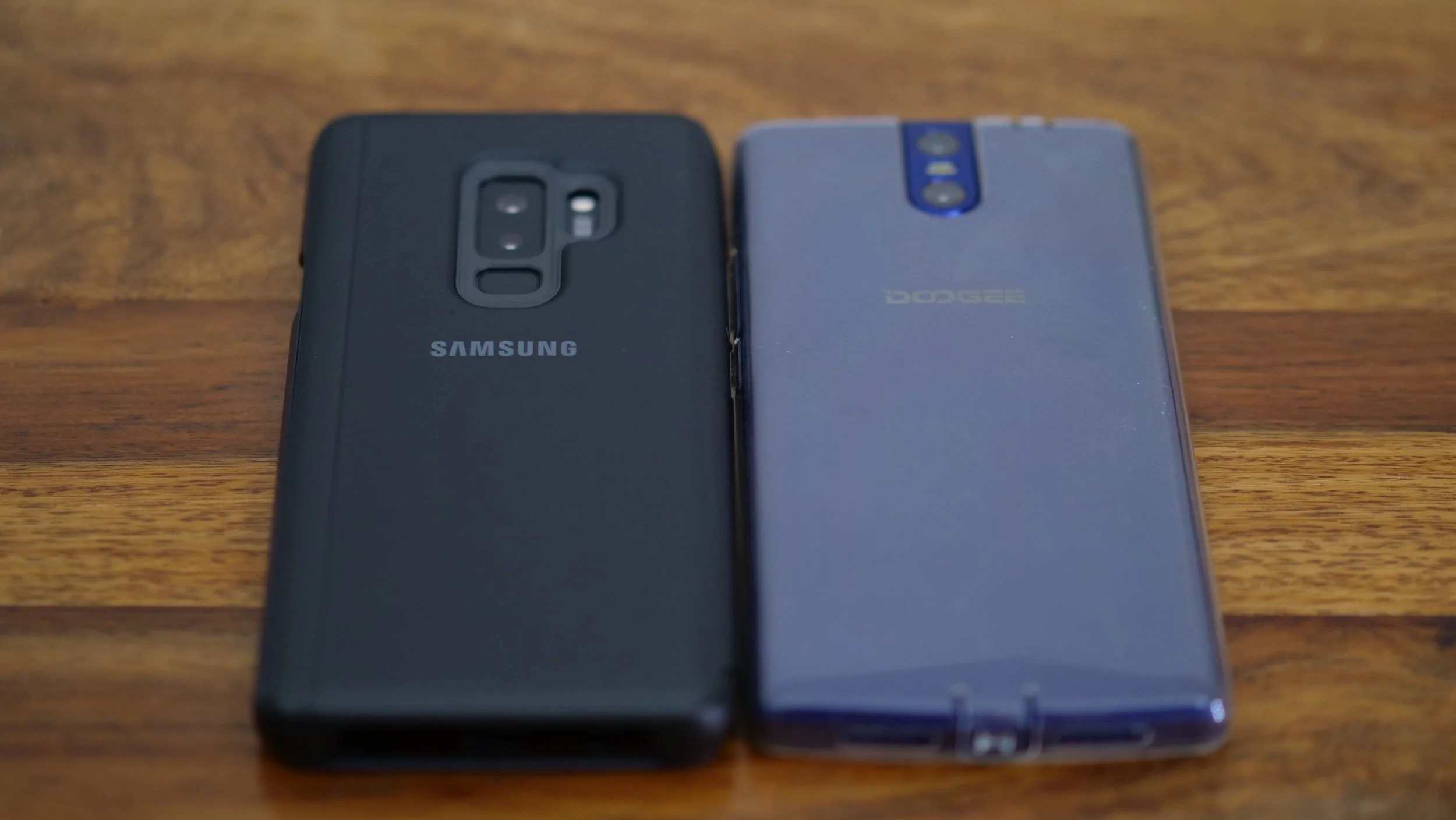
My current daily driver is the Samsung Galaxy S9+, which is a fantastic phone. You can watch my other videos about it on our Youtube channel, including the unboxing video and a comparison with the S8+, focusing on travellers. I'll definitely take it through its paces during this trip.
In addition to this, I'm also taking the Doogee BL7000 (thanks, Matteo!). It's actually the first time that I'm taking two phones with me, but I'll be treating this one as a power bank/music player most of the time. This phone has a 7000mAh battery, so I'm taking it instead of an extra power bank, with the benefit of using it for other purposes as well.
Laptop

My laptop of choice is the new 13.3" Microsoft Surface Book 2. I've stayed with Windows over the years, and I couldn't be happier with this laptop. It has top specs, which allow me to edit 4K video without any issues, great keyboard, and a screen which transforms into a tablet. You can expect a more thorough review on TechTravelGeeks in the near future.
Since I film everything in 4K, and film a lot, I need lots of storage. I'll be taking two portable hard drives, 2TB and 4TB, initially as redundancy, and in case I use more data, as extra storage. I'm also taking a number of SD and MicroSD cards, there's never too many of them.
Entertainment

- Nintendo Switch - it's my first console since the Playstation 2 (I don't play that many games), but I couldn't be happier with the purchase. However, even though I have a few AAA titles like Mario Odyssey and The Legend of Zelda: The Breath of the Wild, and more recently - Doom, I usually play quick games like Pinball and quick racing games
- Sony WH-1000XM2 Wireless Noise Cancelling Headphones - my first noise cancelling headphones, they really changed my commuting and travelling experience forever
- Chromecast - for streaming from my phone or laptop, in case there's a TV and decent WiFi in one of the hotels
Cables and chargers
Lots of them. However, I'm trying to limit the number of chargers I'm taking, so I'll be reusing the laptop charger and drone charger for recharging other devices, since they both have spare USB outs.
I'm also taking a universal power adaptor, which supports 4 different types of outlets, as well as an extension block.
I hope you liked this new section on Tech Travel Geeks. If you did, please don't forget to subscribe to our YouTube channel and hit that "like" button. Also, please do contact us through the comments section on YouTube or via our social media channels, we'll be really happy to hear from you. Thanks for reading!

This Week in Mobile - Quiet Preparations
The Tech Travel Geeks Chief Mobile Opinionist Matteo covers the week's main mobile news subjects for us.
Welcome to This Week in Mobile, Tech Travel Geeks' weekly column covering what has happened in the world of mobile. If we haven't covered it on Tech Travel Geeks we'll link to the best content on the web.
It has been a relatively quiet week for mobile related news and most of us are still getting over last week where we had some pretty major announcements.
My retail unit of the Huawei P20 Pro arrived and I unboxed it on the Tech Travel Geeks YouTube Channel.
First impressions of the Huawei P20 Pro are good. The device feels great to hold and use, the notch isn't an issue for me and the camera still has to win me over. I'll go more in depth on that later this week, here on Tech Travel Geeks.
I'm packing my bags at the moment as I will be travelling to Dubai to speak at droidcon Dubai, the largest Android developer event in the GCC. My talk will be on the Saturday, and this time I am officially representing my employer, Skyscanner. Expect some great content being published on Tech Travel Geeks in the coming weeks as Lukasz will be in Dubai too and we will be shooting video there.
Lukasz published his video of the Samsung Galaxy S8+ vs the Samsung Galaxy S9+. As usual the production values of his content are amazeballs. I really need to up my game on video to at least try and keep our content consistent.

My Pixel 2 XL received its April Security patch. It continues to be one of my main mobile devices and is coming to Dubai with me.
Until next week, that is all from This Week in Mobile. Let us know if you would like to cover anything specific in the coming weeks.

Samsung Galaxy S9+ vs S8+ for travellers
Lukasz Suliga, Chief Aperture Officer of TechTravelGeeks, shares his experiences of using the Samsung Galaxy S8+ and S9+ smartphones. This is told especially from the point of view of travellers and content creators (or consumers). So is it worth getting the S9+ or upgrading? Watch the video to find out what we think.
Hi there, and welcome to TechTravelGeeks. We're continuing our S9+ coverage with a question - is the S9+ an upgrade over S8+, especially if you're a traveller? Let's see.
As we discussed in the unboxing video, there's not much of a difference between the phones when it comes to design. Size-wise, the S9+ is very slightly shorter due to smaller bezels, but also marginally thicker and heavier. Some of this also affected how the screen is situated, making the new phone slightly more durable. And for a phone which is mainly glass, any improvement in that area is welcome. Also, arguably, the phone is now slightly more comfortable to hold, but that's quite subjective and you're unlikely to notice unless you hold both phones one after another.
Continuing on the subject of the screen, the current one is an evolution of the last year's edition, but it's now brighter by around 15%, which should definitely help both when used in darkness, but also when using in bright light. But you can't go wrong with either of those screens, both are still top of the class. They also both support HDR video, so if you want to watch some high quality Netflix content on the plane, you can definitely do that.
When it comes to hardware, as expected, the S9+ is an evolution in most areas - the processors are now faster and perform better. There's now 6GB of RAM instead of 4GB, which lets the phone perform slightly better and allows it to keep more applications in memory, increasing load times. What's slightly more practical for travellers is that the storage has increased - the built-in storage has doubled to 128GB, and the maximum SD card capacity has increased from 256 to 400GB. That could come in handy if you take a lot of photos and videos or if you'd like to download all 10 seasons of Friends from Netflix to watch them on your holidays.
There's unfortunately no change in battery capacity, so we should expect similar battery life on both devices. In theory, the S9+ should last slightly longer due to improved and more optimized processor performance, but I haven't noticed a major difference over my two weeks of testing. I also haven't done a proper battery drain test, especially since batteries deteriorate over time, so the S8+ would be at a big disadvantage. Luckily, there's still quick and wireless charging on both devices, no changes there.
Where you will see, or rather hear, a difference, is with sound quality. Both the headphones and speakers are tuned by AKG, which is a brand of Harman, who were acquired by Samsung last year. The speakers are now stereo and sound significantly better and louder. The new phone now also supports Dolby Atmos, but that's limited to music coming from speakers and wired headphones - if you want to experience Dolby Atmos on wireless headphones, you'll have to use a traditional 3.5" cable. But the sheer fact that we still have a headphone jack is great especially when travelling, in case you lose your headphones and need to get a cheap new set at the airport.
Software-wise, there's not much of a difference. The S9+ came out with Android 8, Oreo, and the S8+ has just been updated to Oreo in most markets, so you shouldn't see a big difference there. This of course assumes that you're a fan of Samsung's TouchWiz software, but since you're this far in the video, I'm guessing you don't mind it.
The main difference, as you will know from the "Camera Reimagined" slogan, is the new camera, or rather, cameras. The S8+ had a single 12 megapixel rear camera with f/1.7 aperture and Dual Pixel autofocus. The new one now has two cameras. The additional camera is an f/2.4 aperture lens with autofocus, which allows both to zoom in without losing quality, and improves the portrait mode, allowing much better depth detection compared to the S8+. The main camera has a dual-aperture lens (more on it in the unboxing and a future review) which is fantastic both in low light, where it beats practically any camera (I cannot wait to test it against the Huawei P20 Pro soon), but is also great in bright light.
In addition to improved optics, thanks to the new dedicated memory buffer for the camera and an improved processor, it can now shoot better slow-motion video. Thanks to it, you can now shoot super slow motion videos, allowing you to shoot 960 frames per second of video for 0.2 seconds, extending that to 6 seconds, which results in 32 times slow motion. Just make sure you're shooting in excellent light conditions, since even trying it in a seemingly well-lit room will result in unusable footage, or even no slow-motion at all. The S8+ can only shoot 240fps in HD resolution, while the S9+ can do the same in higher Full HD resolution, which is fantastic. You can expect a separate TTG video on frame rates and how they affect video soon.
There's not much change in the front-facing camera department, both are great, just check out my photo on our About Us page.
So, is the S9+ a worthy upgrade to S8+? It depends on what phone you're currently using and what your budget is. If you're on the S7 Edge or older, or want to move to a Samsung phone, then it's definitely worth it. However, if you're using the S8+ already, it's more difficult to justify the price jump. For me, I've been very happy with it, mostly thanks to the amazing camera, louder stereo speakers, brighter screen and improved performance, and don't regret it at all. But if you don't mind not having the latest phone and camera in your pocket and expect a great device nonetheless, you might be happy either keeping your S8+ or benefiting from recent discounts on that devices and upgrading to it instead.
If you have any questions, leave them in the comments down below and we'll make sure to answer them.
Thanks for reading TechTravelGeeks!

Samsung Galaxy S9+ unboxing video
Hi there, and welcome to the very first TechTravelGeeks video. We're starting on a high note, with the unboxing of the Samsung Galaxy S9+ phone. It's Sammy's flagship phone for the first half of 2018, so the expectations are high. So let's see what we have here!
This is the official UK version of the phone, pre-ordered from Samsung, so you can see the original packaging with some paperwork and of course, the new Samsung +6S, I mean S9+. This is the European version of the device, so it runs on the latest Exynos 9810 processor, but more on that later.
On the box, in addition to Matteo's reflection and the specs on the back, you can see a few brands or trademarks, namely DUOS (for dual sim), Secured by Knox (Samsung's security guarantee) and AKG (for the earphones and speakers).
Once we open the box, we actually don't see the phone itself, but the packaging for the sim eject tool, as well as some more paperwork. And finally, the phone. Let's get rid of some of the protective wrap - the front and back are easy enough, but the sides were very finicky and difficult to remove. But once we're through with it, we can get the nano SIM card in and boot up the device. All good!
To finish off, let's see what we get - a travel adaptor, a USB type C to USB female adaptor for data transfer from the old phone, the micro USB to type C adaptor, a USB cable, headphone rubbers and the AKG headphones - yes, there's actually a phone with the headphone jack in 2018!
The S9+ and S8+ boxes are really similar, with the S9+ being slightly taller - maybe to handle the extra camera and double the internal storage? And when you look at the phones, you'll actually find it really difficult to tell them apart when looking at them from the front - the only difference is that the top and bottom bezels are thinner by around 1.4mm total . Not that much, but it does make a bit of a difference, at least to me - I have to justify getting this phone, don't I? The sides are the same, but the really difference is with the backs - we get two cameras this time, and the fingerprint reader is finally at the bottom rather than at the side. So we can see that Samsung have actually been listening to the users and reviewers and fixed the most irritating feature of their last year's phones.
I've now been using the S9+ for two weeks and have been enjoying it a lot, especially thanks to the small improvements like stereo speakers, better and faster unlocking, amazing screen and, most importantly, the fantastic camera, but more on that in future videos. For now, thanks for watching, and again, welcome to TechTravelGeeks!