

DJI Osmo Mobile 3 Combo Review - Excellent Phone Stabiliser
Our Chief Aperture Officer, Lukasz, reviews the DJI Osmo Mobile 3, the foldable gimbal for smartphones.
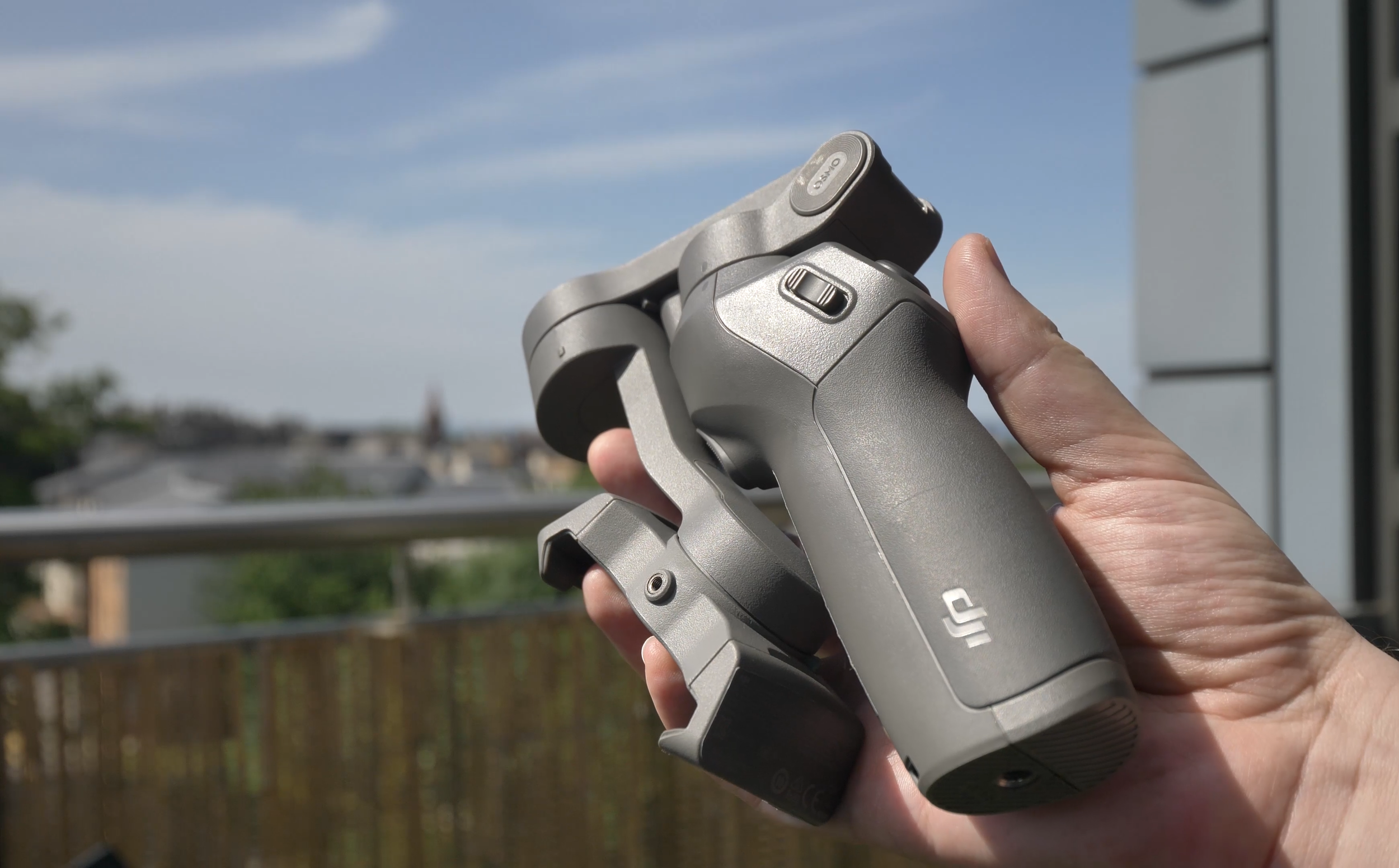
DJI Osmo Mobile 3 stabilizer, folded
We’ve been using the DJI Osmo Mobile 3 gimbal for some time now, and we’ve just released the full video review of the device on the Tech Travel Geeks YouTube channel. You can watch it below, or continue reading for the written review.
You can buy the Osmo Mobile 3 Combo on Amazon: https://amzn.to/2X1HQkY
Video stabilisation
Let’s just start with what this product is and why you might need it. It is a mobile phone gimbal, which provides one of the best video stabilisations for your phone. It will allow you to take some buttery smooth footage while filming on the move.
Here’s a sample video we filmed near Arthur’s Seat in Edinburgh, Scotland, using the Osmo Mobile 3 and the Huawei P30 Pro:
There’s a spring-loaded tension grip where you put your phone and keep it there securely. Luckily, there’s some curvature, so unlike some other devices or phone handles, it won’t press your power or volume buttons by accident.

Grip of the Osmo Mobile 3
It should fit most devices without a case or with thin cases on them, but thick gaming or rugged phones like my Doogee S95 Pro might not fit securely, so be mindful of that - it should work with phones of up to 9.5mm.
Before each use, you should balance it to get the best stabilisation of your footage, just make sure it’s nicely centered.
The footage comes out great, as you can see in some test footage. Everything is smooth and very stable, it’s best in class at the moment.
It’s great that you can use it both to film yourself, vlog-style, as if you had a stabilised selfie stick, or film your surroundings, at a flick of the switch.

Using DJI Osmo Mobile 3 as a selfie camera
Build quality
The gimbal is much smaller than I expected, especially when it’s folded. The fact that it folds is one of my favourite features - large size is the main reason I don’t use my large Zhiyun Crane gimbal for my main camera.

DJI Osmo Mobile 3 with Huawei P30 Pro compared to Zhiyun Crane and a Panasonic Lumix G80 camera
You can easily notice its weight at 404 grams or 14 ounces, but it makes it sturdy and very solid. Overall, despite it being made of plastic, I really like the build quality and the fact that it fits nicely with the DJI design language.

DJI Osmo Mobile 3 next to the original DJI Mavic Air drone
Hardware controls
When it comes to hardware controls, make sure you check the unboxing video, which you can find embedded below. We went there through all of the controls on the device like the joystick and the buttons. With those controls, you’ll be able to tilt, zoom, record, switch between camera positions, all without touching your screen. The controls are really handy and allow to focus on filming. It’s also great that you can configure the speed of response to get more cinematic footage. Plus, the battery life is fantastic - 15 hours should last a few days of shooting, plus it even lets you charge your phone, so you basically get a free powerbank included, great stuff.
Software
The Osmo Mobile 3 comes with the DJI Mimo app, which is a bit of a mixed bag, especially on Android. Interestingly, DJI released a major software update as we were finishing this review, so my device is actually better now than it was just a few days ago.
One of the issues was to do with frame rates and slow motion. Up until recently, you could only shoot 30 frames per second and there was no slow motion option. After the release, some phones now should have 8 times slow motion support - it works on my Huawei P30 Pro, but not on the Samsung S9+, which should support it as well. Similarly with 4K 60 frames per second, which my Samsung should support, but all 60fps options are greyed out. On Huawei, I can select 60fps options in FullHD, but since the phone itself doesn’t support 4K60, no luck for me there.

Limited frame rate selections currently on Samsung Galaxy S9+
When supported, slow motion functionality can be quite useful, so I hope DJI continue working on improving the app.

Filming slow motion video with DJI Osmo Mobile 3
The other major issue is that there’s no support for wide angle camera, you can only use the main lens. That’s a major bummer to me as well, since wide angle cameras are really cinematic in modern phones.

Lack of wide angle lens support on DJI Osmo Mobile 3
In addition to the video mode, there’s also photo mode, which can be useful for group photos - just enable gesture control and you can snap a great photo of yourself or with others.

Using DJI Osmo Mobile 3 with gesture control to shoot group photos
Functionality of the app depends heavily on the phone you have - in addition to missing slow motion, my Samsung S9+ didn’t have the night mode, HDR video or video bokeh, but to be honest, I’m not sure I’d be using any of them with the gimbal, since they have better equivalents in native camera apps.
However, the panorama mode is actually really useful with a tripod, so it’s worth checking out. It combines 9 photos into one, as per the example image below.

9x9 panorama photo taken on DJI Osmo Mobile 3 and Huawei P30 Pro
Timelapses are great and allow you to select up to four points which the camera will follow, as per the lovely shot of a swan which you can see in the video review.
There’s also hyperlapse, which is a moving timelapse or a video in fast forward. Stabilization helps a lot in this case. You might have seen it already in our sample footage, it’s really great.
Story Mode
So far, all the functions before are common in other camera apps, but two are quite unique to DJI Mimo. The first is the Story mode. It allows you to create short video stories, which follow a certain theme. There’s plenty of them to choose from, all with musical background and some transitions in between shots. Just follow the on-screen instructions and record between 3 and 6 quick shots, and the rest will be done automatically. For people who don’t have the time for video editing, this might be very useful. Just be careful - templates with text will actually add the text in, so you might end up with some random quotes like I did. What’s more, the default resolution is 720p (or HD), so you have to change that yourself, and you might also want to remove the Osmo watermark. Luckily, you only have to do it once.

Story mode in the DJI Mimo app by Moment
On the positive side, you can customize the templates or create your own, so if it’s something you’re into, it’s worth trying.
ActiveTrack 3.0
The main reason to use the DJI Mimo app, however, is the ActiveTrack 3.0 functionality. If you’ve used other DJI products like their drones or the professional Ronin stabilizers, you might have seen it before. Just draw a rectangle around a target and the gimbal will do all it can to keep it in the center. It works really great. On a trip in the hills, I actually tried to lose the tracking, but it kept up really well.

ActiveTrack 3.0 on DJI Osmo Mobile 3 is great at keeping track of the target
You can also use it for filming yourself. Maybe you want to start the best cooking show ever from your kitchen, but don’t have anyone to keep the camera aimed at you? No problem, Osmo Mobile 3 will move the camera and ensure you’re always in the centre of the frame. Or maybe you want to stream a heavy metal concert on Twitch, from the same kitchen? Sure, that’s also easy, just make sure you don’t drop your amp from the stove. The possibilities are endless.
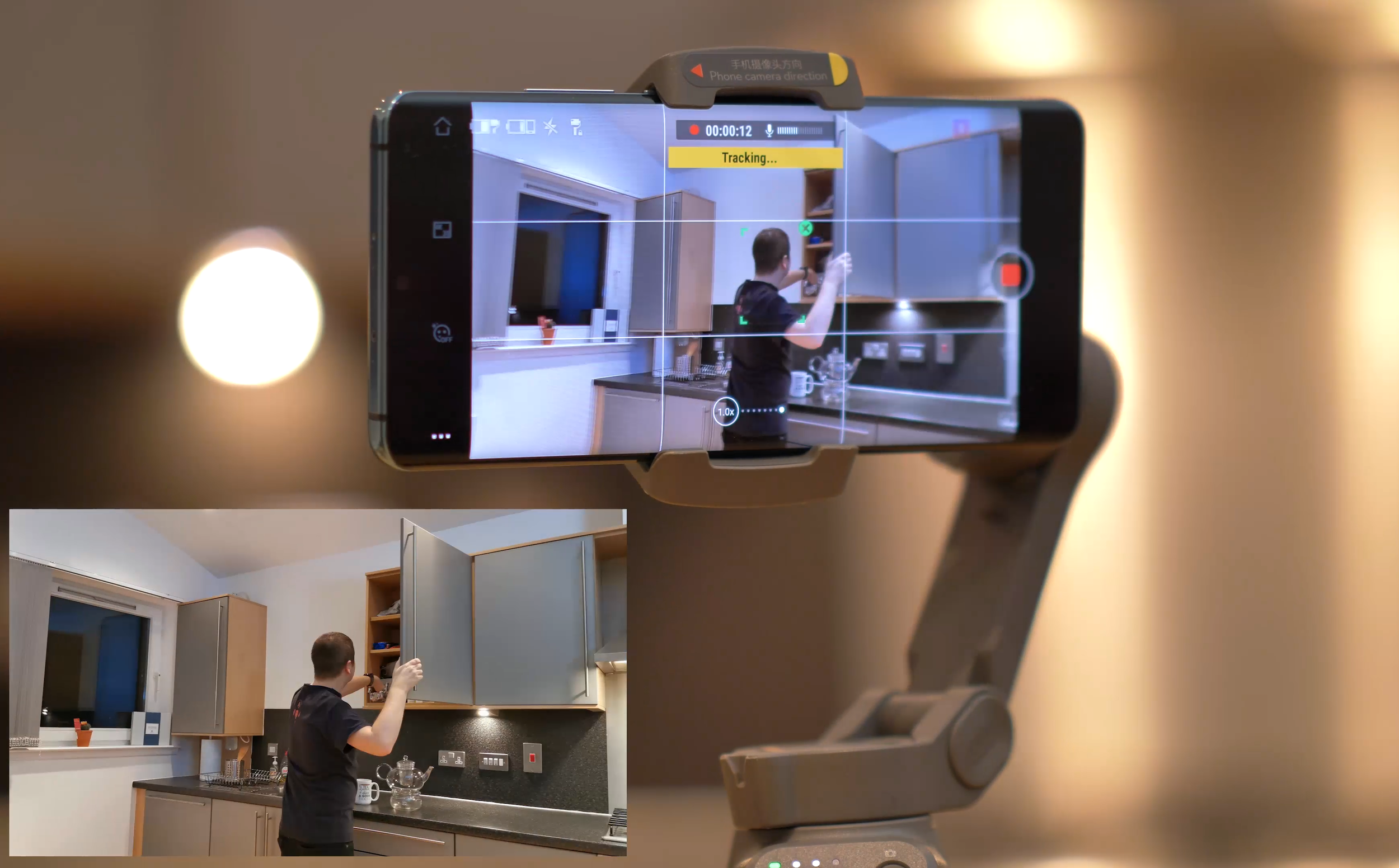
Filming yourself with the DJI Osmo Mobile 3
Overall thoughts
Overall, I really enjoy using the Osmo Mobile 3. I was a bit hesitant to start it, but once I learned how to use it properly and got to know all the features, I was sold. The image stabilisation is excellent and there’s a lot of great functionality to expand your filming toolkit. The app still needs some work, but other than that, I have no complaints.

DJI Osmo Mobile 3 with Huawei P30 Pro, as seen in the Scottish seaside
Thanks for checking this Tech Travel Geeks review!

What's in my bag - Round The World edition
Lukasz is on his amazing round the world trip. In this post he enlightens us on what tech he is carrying with him on the epic eastward journey.
Welcome to a new section on Tech Travel Geeks - What's in my bag. We'll be talking about the tech we love and carry with us on our travels. First off, Lukasz.
And it's a big one. This year, I got extended annual leave at my full time job (I work at Skyscanner, the travel search website), and I will be using it to fly around the world in just under 6 weeks. Below, you will find a map with my itinerary:

Around the world in 41 days
Bag

The challenge with this trip is that I hate checking my luggage in - extra time wasted before the flight, risk of losing the luggage, and you need to wait for it to show up after the flight. So I'll be trying to pack all my camera gear, productivity equipment, as well as clothes for the whole trip into one carry-on bag.
My choice of bag is the Hugger 30l Black Camo bag by Douchebags. I've been very happy with it so far, but I've only used it on two short trips, so you can expect more information about this bag in the future. It's been great so far, with a large and comfortable main compartment, handy top pocket (especially at airports) and a laptop case on the back. We'll see if my opinion changes after 16 flights and 33,000 miles.
Camera and lenses

As Chief Aperture Officer at Tech Travel Geeks and a big camera enthusiast, the majority of space in my bag is taken by my camera equipment. My camera of choice is the Panasonic Lumix GH5, which is one of the best Micro Four Thirds cameras on the market, especially for video shooters. It has fantastic 4K image in 60 frames per second, which allows me to get slow motion from all of my footage without the need to change any settings. It also has top-of-the-line image stabilization and a way-too-uncommon flip-out screen, which for me is a deal breaker for other cameras. Sony, your move!
I'm also taking a few lenses with me. Starting from the widest, I have the 16-36mm equivalent lens, a 24-120mm equivalent zoom lens, my favourite - the 85mm-equivalent lens, and the telephoto 70-200mm equivalent. I might have to leave one of them home, as they don't all fit into my Amazon Basics camera bag, but we'll see how much space I'll have when I add clothes and other necessities.
For audio, I'm taking the Rode VideoMicro microphone with a wind shield. This time, I'm leaving home the Zoom H5 audio recorder due to space constraints, and because I wouldn't most likely have enough time to use it for run-and-gun filming.
Other filming equipment

- DJI Mavic Air drone - the smallest 4K drone available, a fantastic and hugely enjoyable tool which allows creating some amazing footage. You can see my unboxing and first impressions video, recorded for Coolsmartphone.com, on my Youtube channel, but also expect more on TechTravelGeeks
- GoPro Hero 5 - a useful tool especially for extreme sports and water sports, so I'm hoping to use it a few times, together with the floating handle and Lumecube, a great waterproof LED light, which might come in handy underwater
- Joby GorillaPod - the key tool in Casey Neistat's arsenal, so I couldn't leave it out. What I'm leaving home, however, is the Zhiyun Crane gimbal stabilizer, but it's way too big and heavy for this trip
Phones
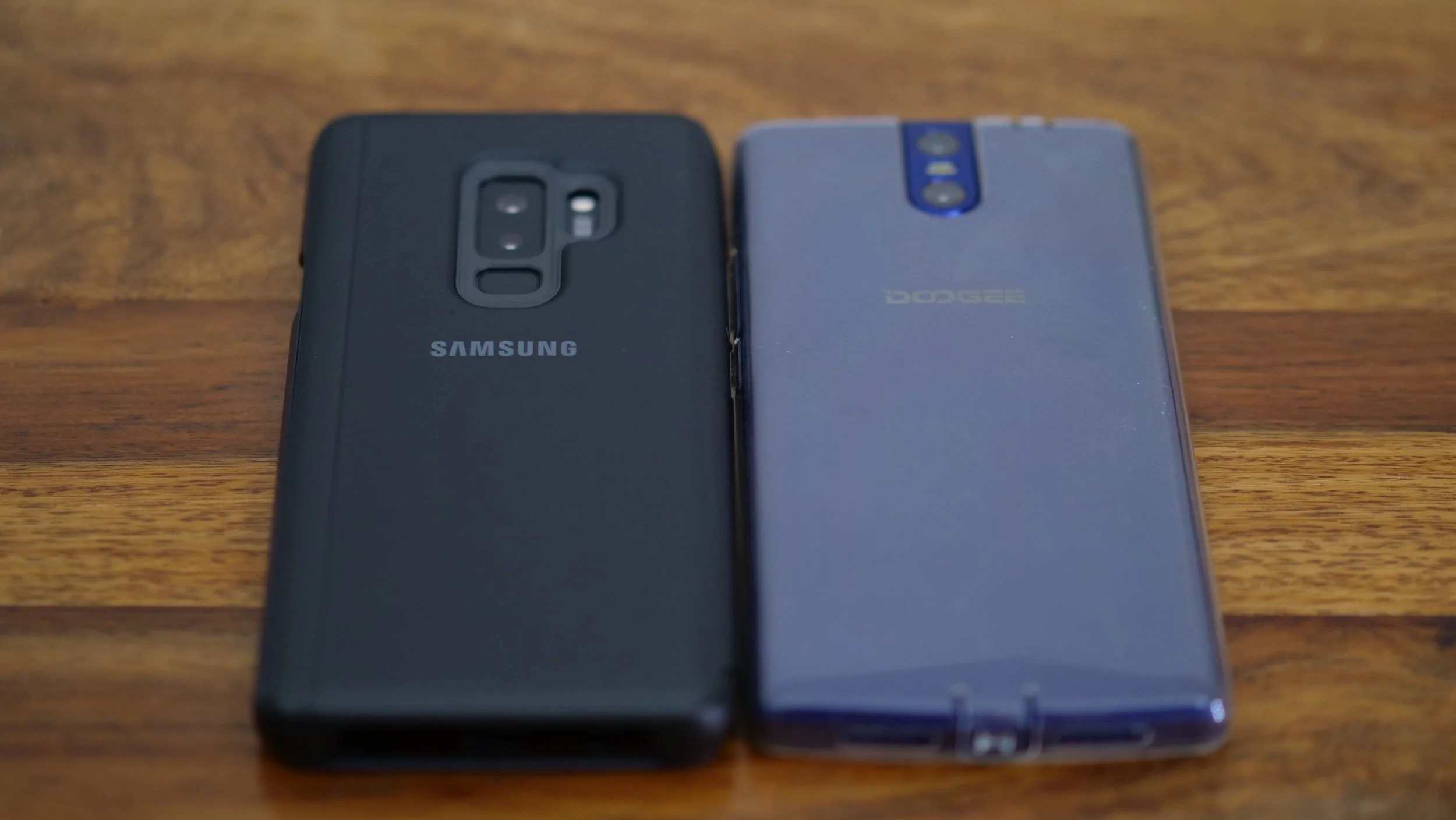
My current daily driver is the Samsung Galaxy S9+, which is a fantastic phone. You can watch my other videos about it on our Youtube channel, including the unboxing video and a comparison with the S8+, focusing on travellers. I'll definitely take it through its paces during this trip.
In addition to this, I'm also taking the Doogee BL7000 (thanks, Matteo!). It's actually the first time that I'm taking two phones with me, but I'll be treating this one as a power bank/music player most of the time. This phone has a 7000mAh battery, so I'm taking it instead of an extra power bank, with the benefit of using it for other purposes as well.
Laptop

My laptop of choice is the new 13.3" Microsoft Surface Book 2. I've stayed with Windows over the years, and I couldn't be happier with this laptop. It has top specs, which allow me to edit 4K video without any issues, great keyboard, and a screen which transforms into a tablet. You can expect a more thorough review on TechTravelGeeks in the near future.
Since I film everything in 4K, and film a lot, I need lots of storage. I'll be taking two portable hard drives, 2TB and 4TB, initially as redundancy, and in case I use more data, as extra storage. I'm also taking a number of SD and MicroSD cards, there's never too many of them.
Entertainment

- Nintendo Switch - it's my first console since the Playstation 2 (I don't play that many games), but I couldn't be happier with the purchase. However, even though I have a few AAA titles like Mario Odyssey and The Legend of Zelda: The Breath of the Wild, and more recently - Doom, I usually play quick games like Pinball and quick racing games
- Sony WH-1000XM2 Wireless Noise Cancelling Headphones - my first noise cancelling headphones, they really changed my commuting and travelling experience forever
- Chromecast - for streaming from my phone or laptop, in case there's a TV and decent WiFi in one of the hotels
Cables and chargers
Lots of them. However, I'm trying to limit the number of chargers I'm taking, so I'll be reusing the laptop charger and drone charger for recharging other devices, since they both have spare USB outs.
I'm also taking a universal power adaptor, which supports 4 different types of outlets, as well as an extension block.
I hope you liked this new section on Tech Travel Geeks. If you did, please don't forget to subscribe to our YouTube channel and hit that "like" button. Also, please do contact us through the comments section on YouTube or via our social media channels, we'll be really happy to hear from you. Thanks for reading!