

Pocophone POCO F2 Pro by Xiaomi - Long-Term Review
Our Chief Aperture Officer, Lukasz, presents a long-term review of the POCO F2 Pro by Xiaomi. We discuss all of the aspects of the device, including the build, screen, software, cameras and connectivity. Check it out to see how he enjoyed using it as his main device for over 6 weeks.
We’ve been covering the Pocophone POCO F2 Pro by Xiaomi on the Tech Travel Geeks YouTube channel, including unboxing it and setting it up with MIUI 12, as well as sharing a detailed camera review and some sample footage.
After around 6 weeks of using it as my main device, I’m keen to share my thoughts on the build quality, performance, cameras, connectivity and overall thoughts about the device. Check our full video review embedded below, or continue reading for the written form instead.
You can get the Xiaomi POCO F2 Pro on Amazon here (affiliate link): https://amzn.to/30w3C22
Build Quality

POCO F2 Pro’s build quality is premium and feels good in hand
The build quality is great, with both the front and back covered with Gorilla Glass 5 for protection, and an aluminum frame for stability. The back is slightly curved with matte finish, making it feel quite premium. It looks good in the hand, but it’s quite a bit slippery, so I’ve personally been using a flip case, as I usually do - check our unboxing and first impressions video below.
One of my favourite design features is the red power button, which stands out quite nicely and is very recognizable. I also like the design of the circular camera unit, which comes with some great detailing and an embossed circle surrounding it.

POCO F2 Pro’s power button has a distinct red colour
The one thing I miss here is waterproofing. The phone is fine with some splashes of water and protected from dust, but I wouldn’t recommend putting it under water. I personally consider it quite an important feature, so it’s too bad that it’s not available here.
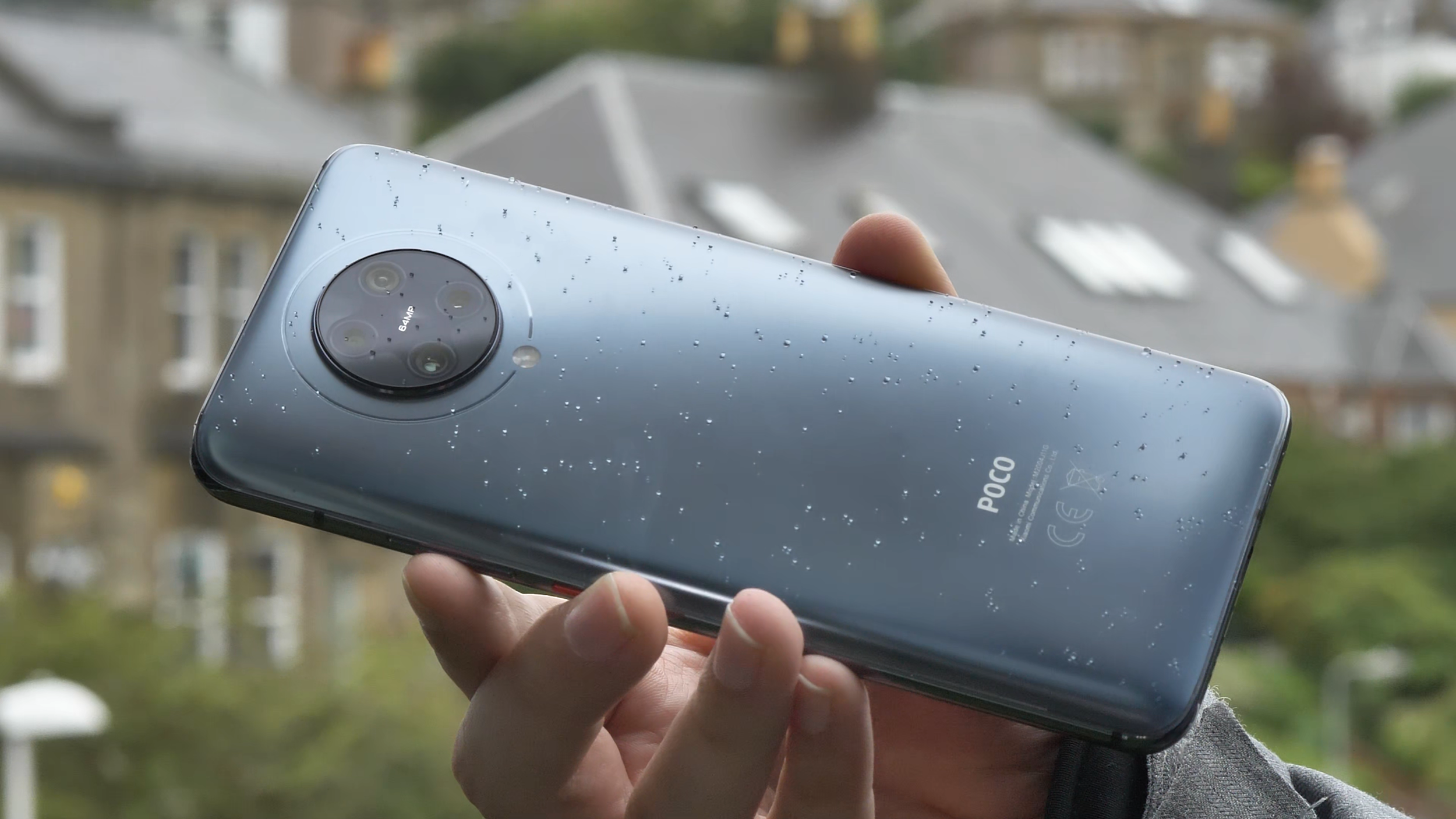
POCO F2 Pro lacks waterproofing, but can survive a bit of Scottish rain
The other thing to note is that the phone is quite chunky and heavy at 218 grams, and quite big thanks to the massive screen, which we’ll discuss just now.
Screen
The screen on the Poco F2 Pro is really good. It’s a Super AMOLED 6.67 inches diagonal screen with a 1080 x 2400 FullHD+ resolution and 20 by 9 aspect ratio. It’s quite bright and I’ve not had any issues with viewing it in brighter environments, but then again, I live in Scotland, so I’m not too demanding. The colour reproduction is good and you can even configure the colour gamut to your liking in software - plenty of choice here. The screen also supports HDR+. Unfortunately, there are no high refresh screen options, so it’s stuck at 60Hz, rather than 90 or 120 in some more expensive competitors.

POCO F2 Pro’s screen is bright, but with no high refresh rates
One of the key features of the screen though is that it doesn’t have any notches or cut-outs, and the bezels are really small. That’s thanks to the pop-up camera, which hides when it’s not needed, and only pops up when you have to use the front-facing camera. That makes the viewing experience much more enjoyable, so I’ve been thoroughly enjoying watching lots of YouTube and some Netflix on it.

POCO F2 Pro’s pop-up camera
And before anyone asks - the pop-up mechanism retracts automatically when it’s falling and it’s quite robust, so we’re not expecting any issues with it.
Performance
Similarly to its predecessor, the Pocophone F1 (check our full video review on YouTube), the F2 Pro also sports a high end spec sheet. It’s powered by the Qualcomm Snapdragon 865 octa-core chipset, which at the time of release was the highest end processor you could get. It also uses a highly-performant Adreno 650 graphics card.
I’ve spent quite a lot of time playing different games on it, trying to make it sweat, but I’ve struggled to do so. That’s probably thanks to this phone’s LiquidCool cooling technology, which ensures that the chipset isn’t throttled at any point, so it’s running at full speed for longer.

Call of Duty Mobile works great on the POCO F2 Pro
I tried popular shooting games like Call of Duty Mobile and Fortnite, and both worked great. I tested some of the most demanding 3D games, and they all worked great as well. I even tried to play some high end emulators like Playstation 2 and GameCube, and again, it was just pure joy. I managed to get almost consistent 60fps and quick load times on PS2’s God of War, compared to just 30fps on my one and a half-year-older Huawei P30 Pro. So, if you’re into gaming, getting a Snapdragon 865 device is a great option. Playing some games on a screen with no bezels and with a good game controller is definitely great fun, no matter if you like to play online, casually or enjoy high end gaming.

God of War on the DamonPS2 emulator works flawlessly in constant 60 frames per second
To round off the specifications, our model came with 6GB of memory and 128GB of storage, but there’s also an 8GB RAM with 256GB storage model as well. Unfortunately, there’s no memory card support, so be mindful of that if you want to store a lot of large games and videos on your device. You can check your phone’s configuration using the beautifully presented and useful “about phone” screen, which nicely brings me to the software experience.
Software
Poco F2 Pro runs Xiaomi’s MIUI software. It was recently updated to the latest MIUI 12, make sure you check our setup video below. The software is now more refined, especially when it comes to animations. My favourite feature is “super wallpapers”, which currently include Earth and Mars. If you enable always-on display, you can see the globe, which will then zoom in and show the animated wallpaper. When you swipe left or right, the animation will move accordingly. Luckily, it doesn’t move all the time, so it doesn’t cause any dizziness. This is different to “live wallpapers”, which are actually live animations and are constantly moving. To be honest, it’s not really something for me, but I guess some people might like it.
Overall, I’ve been enjoying the software experience on Poco F2 Pro. It is smooth and dynamic, and the Poco launcher is great for me. I enabled the split notification bar with the control centre, reminiscent of the user interface of a certain fruity company, after I got the update, and I’ve been quite happy with it, but it definitely required some getting used to.
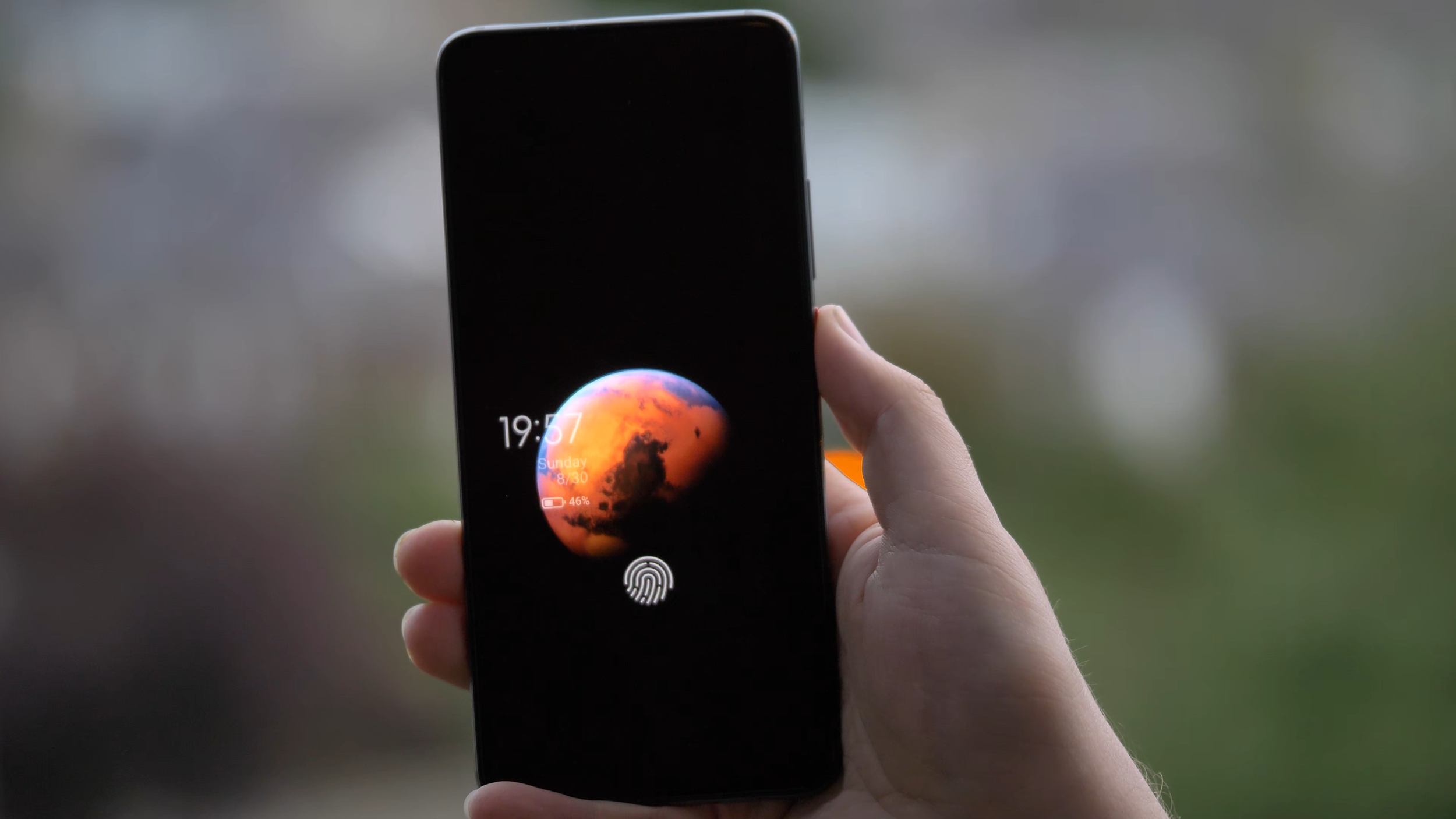
MIUI 12’s Mars “super wallpaper” is really impressive
I really liked how customisable everything is. For example, in the app drawer, I’m used to having the letters on the side to quickly jump to the app I’m looking for, but it was not there to start with. However, it turns out it’s easy to enable and works even better than I expected, as it temporarily highlights all the apps starting with that letter. The addition of search bar, frequently used apps and app categories to the side makes finding apps a breeze. You can even reorder those categories or disable some of them, that’s really great.

MIUI and the Poco Launcher are very customisable
When it comes to downsides, as mentioned in the setup video, there are quite a lot of preinstalled applications and games. Luckily, it’s possible to uninstall most of the apps and games from here, so it’s not a big problem. There is also some advertising within the software, including “promoted apps” in some of the folders. Luckily, you don’t have to use those folders and can create your own, so that’s not an issue either. You can also disable most of the ads - the one I removed was in the Security app. After installing apps from Google Play store, there is a security check for that app, and an ad pops up, but it’s possible to remove it easily, so it hasn’t been a problem for me.
As I was writing this section, I got a software update with the July 2020 security update and some fixes, including screen responsiveness when unlocking. I hope this helps with the fingerprint scanner, which brings me to the next point, security.
Security
When it comes to security, there are plenty of options. My usual favourite is the fingerprint scanner, which I’ve been using the most. Unfortunately, the under-screen reader on the Poco F2 Pro is not the best I’ve used. It is a bit slower than I’m used to, and I’ve had times when my fingerprint wouldn’t get recognized even after a few attempts. However, the animation is great and the haptic feedback is good, so it’s just that it’s not always recognizing my fingerprint fast enough.

POCO F2 Pro’s fingerprint scanner is nicely animated, but not the fastest or most accurate we’ve used
The other option, other than patterns and pass codes, is face unlock, which uses the pop-up selfie camera of the Poco F2 Pro. It’s actually fast and handy, but it requires an extra swipe to unlock and it takes a moment to happen. But it’s definitely a nice party trick, and the LED lights by the selfie camera are just mesmerising. Which brings us to my favourite section - cameras.
Photos
The Poco F2 Pro has quite a robust quad camera setup, consisting of a 64 megapixel f/1.9 main sensor, 13MP ultrawide lens, 5MP telemacro lens and a 2MP depth sensor for portrait shots. And overall, it does a good job to deliver nice photos, but not in all the situations. Let’s go through some examples.

POCO F2 Pro’s camera array
I really liked many of the photos taken with the main lens. By default, it does what’s called pixel binning, so it combines each 4 pixels into one that’s an average of the four, which is actually better, since each pixel is bigger and can collect more light. Because of that, most of the images are 16 megapixel, which is plenty for any camera. If you need 64 megapixel photos, you can enable that mode, but unless you need to shoot a photo for a billboard, I wouldn’t recommend it.




To take 64 megapixel photos, you need to use the Pro mode, which also allows you to control all the parameters like aperture, shutter speed, ISO or to focus manually. You can also shoot RAW photos in this mode - I wish there was an option to have RAW output in all situations, not just in Pro.

Pro mode in the F2 Pro’s camera app
I especially liked portrait and aperture photos, which came out quite nicely in most cases, probably thanks to the additional depth sensor. Look at this photo - you can see how the hair is nicely kept in focus, while the background is accurately blurred.

Portrait mode on POCO F2 Pro is quite good
However, I did have a few situations where the focus wasn’t right, especially for some objects. I was especially hoping for this photo to come out nicely, but instead of focusing on the flower, the camera focused on the hand. It’s still a lovely photo though.

POCO F2 Pro focusing on the hand rather than the flower
In some other cases, the colours were unfortunately a bit oversaturated, like this strawberry or some of the flower photos I took. Even more so, this was visible with the grass in some of the photos. It might be actually related to the auto HDR mode, which I normally have on, so you might want to be careful with that.



I really liked the wide angle lens, it complemented the main lens quite nicely. I managed to take some really nice photos with it, so no complaints, I really like taking nature photos with it, and it’s also great for some architecture photos.





The camera app also shows the option of two times zoom, but unfortunately, they’re just using the main lens and zoom in digitally, like you could do in any editing software by just cropping the image. Because of that, the photos come out a bit pixelated. It’s a bit of a shame, as having a good optical zoom lens is always great.

2x zoom images get pixelated as the images are cropped rather than using an optical zoom
The 5MP telemacro lens is instead used for macro shots. And they are actually quite nice if you remember to switch the super macro mode on. I especially like this photo of Thanos’s Infinity Gauntlet.

Macro mode on POCO F2 Pro is decent, but not as useful as a potential zoom lens
Poco F2 Pro’s night mode is decent, especially with the main lens. I’ve seen a few photos with some colour shift, but most of them were quite good. Check those really nice photos in Edinburgh during the festival of light here. Most of them came out surprisingly well, so no complaints from me. Just make sure to enable night mode, as the main lens’s aperture isn’t that wide at f/1.9.






Video
When it comes to video recording, I’m quite happy, especially with the wide range of resolutions and modes available. Check our sample video below, and for more sample footage, check our full camera review above, which has more samples embedded.
The mode most people will likely be using is 4K 30 frames per second, and I really like the video quality. If you haven’t already, make sure to check our sample video, link in the description. Both the quality and stabilization are really good. One thing to remember is to avoid really fast panning movements, but that’s the same for all cameras, as the rolling shutter affects mobile cameras quite a lot.
There’s also 4K 60 frames per second, which is great for a bit of slow motion footage - however, to make it slow motion, you need to use some editing software. What’s good about it is that you can record quite long videos with it, unlike some slow motion modes.
When it comes to slow motion, you get a range of different frame rates and resolutions, as with many modern phones. You can get bursts of up to 960 frames per second in HD resolution, and up to 240 frames per second in Full HD resolution. Just be careful, as you need a lot of good lighting for decent video quality.

The camera app offers a wide range of frame rates and slow motion options
Speaking of resolution, thanks to the Snapdragon 865 chipset, the Poco F2 Pro is capable of recording 8K video. Since the adoption of 8K screens is minimal, I’d say this is more of a gimmick for now, unless you have a very specific use case. Since it’s double the resolution and 4 times the number of pixels, you can zoom in after the fact and get additional framing without losing any quality. So if your video is supposed to be 4K, you can zoom in on the face, or in my case, the guitar, and still have great quality after the fact.
However, there are some downsides. First, the stabilization doesn’t work as well and there can be some stutter. The file size can get quite big. And finally, two of my Windows machines experienced strange issues with artifacts when viewing the footage in different media players, probably due to codecs. The problem disappears when you convert the footage or upload to YouTube though. However, for now, I’d say mobile 8K is not ready for prime time just yet .

8K video as viewed on VLC Media Player on Windows 10 with default codecs
The video from the wide angle lens has been really good as well, especially for nature shots. Check out the next clip, recorded in 4K using the wide angle lens and with audio straight from the phone.
The selfie video camera is all right. Unfortunately, there’s no wide mode and there’s no 4K, but the normal 1080p is good, as you can see from this short video from Dunfermline in Scotland. The dynamic range is also good.
Overall, I’m very happy with the video capabilities of the Poco F2 Pro, and quite impressed by close up videos.
Overall Camera Thoughts
All in all, I’m really happy with the cameras on the Poco F2 Pro. They’re quite flexible thanks to a good main sensor and a capable wide angle lens. I especially liked the aperture shots, but I might just be overusing them a bit. It’s too bad there’s no real telephoto lens, but it’s understandable at this price point. The video capabilities are really good, especially the image stabilisation and the wide range of modes, so I’m really happy about that. Granted, it’s not the best camera set you can find on a phone right now, but if you’re looking for a very reasonably-priced phone with excellent performance and a good set of cameras, I would recommend this as a potential option, especially if you find a good deal for it.
Battery life and charging
The battery life on the Poco F2 Pro has been fantastic. The device is powered by a huge 4700 milliamp hour battery and it easily lasts the full day of heavy usage. I’ve had more than 7 hours of on-screen time, and that’s really impressive.

The battery is really great, managing a full day’s worth of usage and more
The phone comes with a 30W fast charger, which should charge your phone in just over an hour. In my testing, it wasn’t as fast unfortunately, but I got from 5% to 25% in 13 minutes and to full in one hour 45 minutes, which is still good for such a big battery.

Unfortunately, there’s no wireless charging, which is quite unfortunate, but was needed to keep the price lower.
Connectivity
As far as connectivity is concerned, the phone actually supports 5G, which is a first for me. Recently, the Three network enabled a tower here in Edinburgh, also thanks to our Chief Mobile Opinionist, Matteo, who requested it for our phone tests, thanks for that! On our walk, we got amazing download speeds of more than 600 megabits per second, which is almost twice the fastest broadband I was able to get. This is just crazy. One thing to note, the connection was appearing as either LTE or 4G+ rather than 5G, while Matteo’s OnePlus Nord was showing up as 5G, but the speeds were very similar. Either way, more than half a gigabit per second is crazy fast, so I’m looking forward to seeing it available in more places than just near that one tower in Edinburgh.

While not recognized as 5G, POCO F2 Pro’s download speeds get to around 600Mbps near 5G towers
Other than that, you get all of the latest connectivity options like Bluetooth 5.1, so you can connect all of your favourite devices, as well as WiFi 6 and NFC for payments, which are all great to see. It also supports dual SIM, if that’s something you need.
Audio
The other thing worth mentioning is audio quality. Unfortunately, the phone only comes with a single down-facing speaker which is of decent quality, but a stereo set would be much appreciated.
On the positive side, the phone sports a 3.5mm courage port or headphone jack, so I’m able to rock the Sony XM4 headphones both wirelessly or with a wire. This should help when we’re back travelling, in case I run out of headphone battery.

POCO F2 Pro sports the courage port, also known as the headphone jack
Conclusion
Overall, I’ve really been enjoying using the Poco F2 Pro so far. It’s a great device with excellent performance and smooth software experience at a price much lower than most flagship devices. I got my 6GB version from BangGood for £380, shipped from Spain, but the price is actually going further down and can be found unlocked for around £350, which is amazing.
Granted, the camera setup could be better if there was a proper telephoto lens, the waterproofing and wireless charging are missing, and some might want faster screen refresh rates, but I found those missing features reasonable and have been really happy with my purchase. I’ll definitely continue using this phone, if only to play some games with the highest performance available.
Thanks for checking this detailed review of the Pocophone POCO F2 Pro by Xiaomi. If you haven’t already, make sure to subscribe to our YouTube channel to get notified about our latest videos.

Doogee S95 Pro Super - Rugged Modular Phone Review - IP69K Waterproof Heavy Duty Smartphone
The Tech Travel Geeks’ Lukasz reviews the Doogee S95 Pro rugged modular smartphone. Want to know what he thought about the build quality, performance, cameras and added modules? Watch the embedded video or read the blog post with sample photos and videos
On the Tech Travel Geeks Youtube channel we unboxed the Doogee S95 Pro a few months ago, and had also unboxed the device when we visited their offices in Shenzhen. I’ve been using the Dooogee S95 Pro on and off since then, but I moved my SIM card from the Huawei P30 Pro to it a few weeks ago to properly review it.
You can buy the Doogee S95 Pro Super kit on Amazon: https://amzn.to/2T0NQdt
Want to know what I thought about the build quality, performance, cameras and added modules? Watch the video below or continue reading to find out, and make sure to subscribe to Tech Travel Geeks for more content like this.
Build quality
Doogee S95 Pro rugged smartphone
First of all, the phone is built like a tank. It’s a proper rugged phone with IP68 and IP69K certificates, which means that it can survive “powerful high-temperature water jets”. That’s thanks to industry-leading rubber on the back, which can survive a lot - so much so that it passed the MIL-STD-810G military environmental tests, and that certification isn’t easy to get.
It’s also thanks to the fact that all the ports like USB, SIM and microSD card are securely covered from any external factors.
We took it further though and wanted to see how much it can survive. The phone managed to stay on while being frozen and survived getting “liberated” with a hammer, which is amazing.

Doogee S95 Pro frozen in ice
But then we decided to see if the phone can survive being driven over by a Tesla. The first attempt, on the grass, seemed to be successful, with just some scratches on the screen protector. Unfortunately, the second attempt, on concrete, affected the phone quite significantly - initially the camera app wouldn’t open, and then the screen stopped working properly, getting ghost touches. Removing the screen protector didn’t help solve the issue unfortunately.

Friendly reminder - don’t get your phone run over by a Tesla
So, is the S95 Pro super durable? Yes. Should you drive over it with a car? Here at Tech Travel Geeks, we’d advise against it.
Due to all of this ruggedness, the phone is obviously quite heavy, clocking in at 285 grams. For comparison, my Huawei P30 Pro weights 192 grams, but that’s the price you have to pay for the ruggedness. You’ll also most likely need two hands to operate it.
Screen

Doogee S95 Pro is great for watching some Netflix
The front of the device is a 6.3 inch 1080 by 2246 pixel Full HD screen, making it 395 pixels per inch. It’s an IPS screen, so an LCD rather than OLED. The quality is decent and fine if you want to watch some YouTube videos or even some Netflix on the go, but don’t expect the quality or refresh rates seen on OLED screens in current smartphones. Luckily, it’s still bright and good for daily use.
Performance

You can even play Fortnite on the Doogee S95 Pro!
What really positively surprised me was the performance. Having been mostly using phones with high-end chipsets, I was a bit worried about using a MediaTek chipset. However, the octa-core 12nm Helio P90 chipset impressed me personally. The software experience in the everyday usage was great and with no slowdowns. Everything was really smooth.
I wanted to test it to its fullest and tried throwing all the high end games at it, and I could barely make it sweat. All the recent racing games Asphalt 8 and Asphalt Xtreme were really smooth, and the latest Asphalt 9 was easily playable, with just a bit of a performance hit, but nothing impacting the gameplay. The same with Need for Speed: No Limits or Crazy Taxi Classic. I then tried first person shooters, and Dead Trigger worked really well, PUBG was mostly good, with some minor slowdowns. I was even able to play some Fortnite, with just some minor slowdowns. Only thing to note is that some games took a bit longer to load, despite 8GB of RAM, but you only need a bit of patience, that’s all. Overall, for such a device, it definitely exceeded my expectations.
Speaking of memory, the phone comes with 128GB of storage, and supports microSD cards in case you want to expand it even further.
Software

Doogee S95 Pro running Android 9
The S95 Pro uses Android 9 and hasn’t received a major update in the last 6 months. What’s more worrying, though, is the lack of security updates. As of writing on 8th May, my device is still stuck on January 2020 update. That’s not great unfortunately, so keep that in mind.
Doogee’s launcher is rather basic and doesn’t have an app drawer, so I installed Action Launcher instead, as I personally struggle without the app drawer. However, the overall software experience was all right.
Battery life

Doogee S95 Pro’s 5150mAh battery is great
Another area that’s quite impressive is the battery life, as expected in such a device. The phone comes with a 5150 milliamp hours battery and it will last you a day of constant usage without any problems, and even more if you don’t use your phone as much as I do. If you’re planning to go mountain biking or on a hike, you’ll be sure that your phone is safe AND that the battery won’t run out before the day ends.
When it comes to charging, you have two options. You can use a USB-C cable and plug it in. According to Doogee’s website, it offers 24W “turbo quick charge”. You can also use 10W wireless charging, which is great for a rugged phone like this. In general, you shouldn’t have any battery issues with this device.
Connectivity

Doogee S95 Pro offers global 3G and 4G connectivity
When it comes to connectivity, you should be able to use the phone globally on most 3G and 4G networks, which is great. It supports dual SIM cards, so you can either have a work and personal number, or get a cheap SIM card while travelling. What’s more, it supports NFC, so you’ll be able to make wireless payments using Google Pay or similar, which is becoming more and more important right now.
Cameras

Doogee S95 Pro offers three cameras on the back and one on the front
As someone who loves taking photos, there’s one area which would make it difficult for me to use this phone as my only phone, and that’s the camera. On paper, all looks good - there’s a 48MP main lens with the same sensor as the Xiaomi Mi 9T, an 8MP wide-angle lens and an additional 8MP sensor, as well as an LED flash on the back, and a 16MP front-facing camera.
I managed to take a few good photos with the main lens, before we had to stay home. Here’s a beach in North Berwick in Scotland, Placa de Catalunya in Barcelona and some monument in Barcelona, all looking good.



However, if you take the same photos on the wide angle camera, the colours shift towards red and the photos get darker, become pixelated and are unfortunately unusable.



Unfortunately, it’s the same with the zoom lens - here’s the Arc de Triomphe on the main camera, which looks good, but then the wide angle becomes dark and pixelated, and the 2x zoom looks like an oil painting, losing detail.



The night mode was actually quite good, as per the Sagrada Familia photos I took. Again, as long as you stick to the main lens.



Two of my favourite photos were of food in Barcelona - I really miss travelling now :)

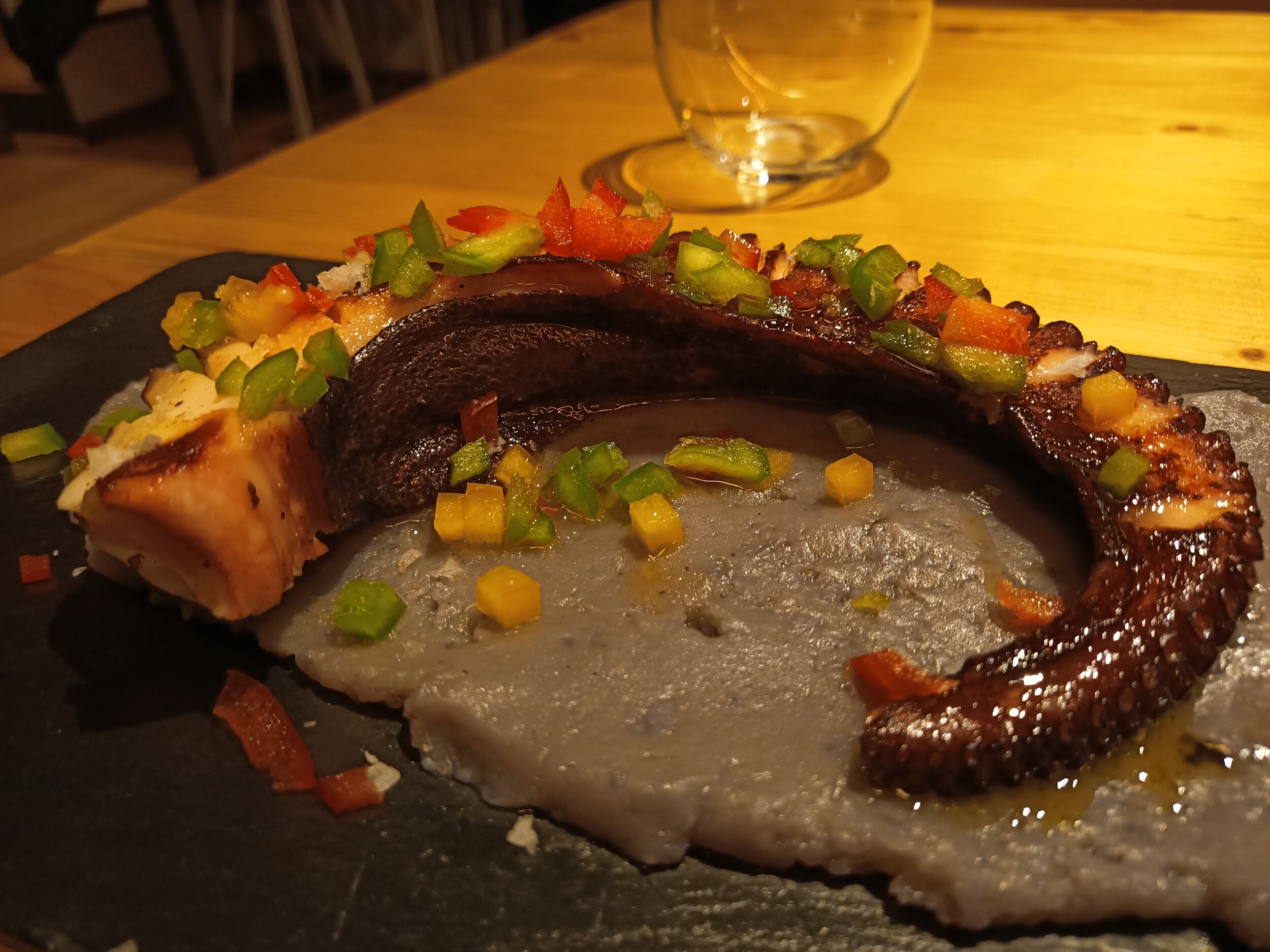
There’s also portrait mode and some shots are good, but it appears to be finding the middle of the image and blurs everything outside, so don’t use it on inanimate objects.



Selfies weren't great, but passable - oh, hi Matteo!



I also used the front facing camera for video calls with family with no issues, as well as to share some guitar practice with my teacher.
For video, you get 4K 30 frames per seconds, just be careful that it’s quite shaky, so I’d recommend stationary shots. The wide angle camera doesn’t work for video though, just main and 2x zoom. Luckily, the 2x video doesn’t seem to suffer from the same issue as photos - just look at this amazing guy in Barcelona!
Modules
Finally, let’s end on something very unique to the Doogee S95 Pro. If you look at the back, you can find a 16-pin connector. There are two optional modules which you can buy in addition to the phone and connect them to the device - a battery and speaker. Exciting stuff!

Doogee S95 Pro Super kit comes with the phone, a battery module and a speaker module
Let’s start with the battery. It attaches really easily, and it stays on really well. It has a cut out for cameras, so you can still use them while charging on the go. The battery has a capacity of 3500 milliamp hours, which means that it should charge around two thirds of the battery, or up to 10 hours. In our tests, we went from 20% to 70% in around 3 hours. I found the battery a really good idea, especially if you’re on the go and urgently need a top-up

Doogee S95 Pro battery module
The speaker module is a 6W one with two speakers, has a 2000 milliamp hour battery and should last up to 3 hours. You don’t need to connect to Bluetooth, it just works. The sound is great, it’s quite loud and can fill a room. My by far favourite function is the stand, which allows you to watch some YouTube or movies on the go without holding the phone.

Doogee S95 Pro speaker module with a stand
Summary
So, what are my thoughts about this phone? If you’re in the market for a rugged phone, this should be a great device for you. It has a great battery, surprisingly good performance, and if you go with the version with modules, the functionality of the phone will increase significantly. It can also survive almost anything. Just bear in mind that the cameras aren’t great and software updates are quite behind, so be cautious if those two things are important to you.

Thanks for watching this detailed Tech Travel Geeks review of the Doogee S95 Pro. If you enjoyed this video, make sure you leave us a like and a comment, and subscribe to our channel for more videos like this - click here to subscribe.
Check our Doogee S95 Pro unboxing videos:
Also, watch the Doogee S95 Pro comparison with the Doogee S68 Pro: